
200-901 · Question #276
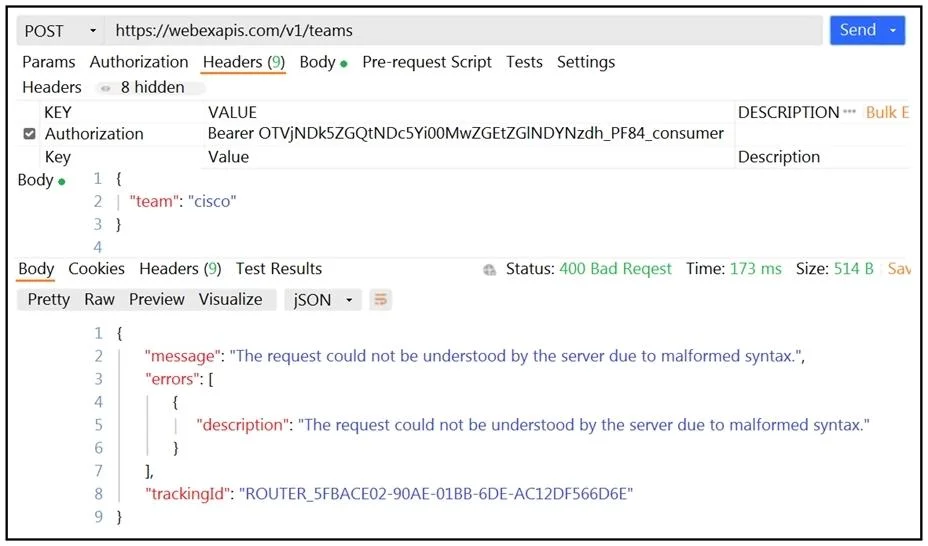
Refer to the exhibit. A developer wants to create a room named cisco through Webex API. The developer prepares the request by putting an API token inside the authorization header; however, the given…
The correct answer is A. Replace the team body parameter with the name body parameter. HTTP 400 (Bad Request) means the server could not understand the request due to invalid syntax or incorrect parameters. The Webex API endpoint to create a room requires the body parameter name (not team). team is a parameter associated with creating or referencing a Webex Team…
Question
Refer to the exhibit. A developer wants to create a room named cisco through Webex API. The developer prepares the request by putting an API token inside the authorization header; however, the given HTTP call returns error code 400. How must the call parameters be changed to ensure a valid response?
Exhibit
Options
- AReplace the team body parameter with the name body parameter.
- BReplace cisco with a valid name for a team.
- CChange the token in the header with the authorization token.
- DChange the HTTP method of the call to PUT.
How the community answered
(42 responses)- A90% (38)
- B2% (1)
- C2% (1)
- D5% (2)
Explanation
HTTP 400 (Bad Request) means the server could not understand the request due to invalid syntax or incorrect parameters. The Webex API endpoint to create a room requires the body parameter name (not team). team is a parameter associated with creating or referencing a Webex Team, not a Room. By replacing the team body parameter with name, the API call will be properly formed and the room named 'cisco' will be created successfully. Option B is wrong - 'cisco' is a valid room name. Option C is wrong - a valid authorization token is already specified. Option D is wrong - creating a resource uses POST, not PUT.
Topics
Community Discussion
No community discussion yet for this question.