
200-901 · Question #253
Drag and Drop Question Refer to the exhibit. Drag and drop the code snippets from the bottom to the blanks in the code to enable keepalive for the FastEthernet 2/0 interface. Not all options are…
The correct answer is interface = model.Native.Interface.FastEthernet(); interface_data = crud.update(provider, interface). The user must correctly order Python YDK commands to instantiate a FastEthernet interface, enable its keepalive attribute, and then read its state from a network device.
Question
Drag and Drop Question Refer to the exhibit. Drag and drop the code snippets from the bottom to the blanks in the code to enable keepalive for the FastEthernet 2/0 interface. Not all options are used. Answer:
Exhibit
Answer Area
Drag items
Correct arrangement
- interface = model.Native.Interface.FastEthernet()
- interface_data = crud.update(provider, interface)
Explanation
The user must correctly order Python YDK commands to instantiate a FastEthernet interface, enable its keepalive attribute, and then read its state from a network device.
Approach. The correct interaction involves dragging and dropping the following code snippets into the three blanks in the specified order:
-
Blank 1:
interface = model.Native.Interface.FastEthernet()- Reasoning: The first step in configuring an interface using YDK is to create an instance of the specific interface class. The documentation clearly shows that
FastEthernetis a specific type of interface within the 'Native.Interface' hierarchy, somodel.Native.Interface.FastEthernet()is the correct way to instantiate it.
- Reasoning: The first step in configuring an interface using YDK is to create an instance of the specific interface class. The documentation clearly shows that
-
Blank 2:
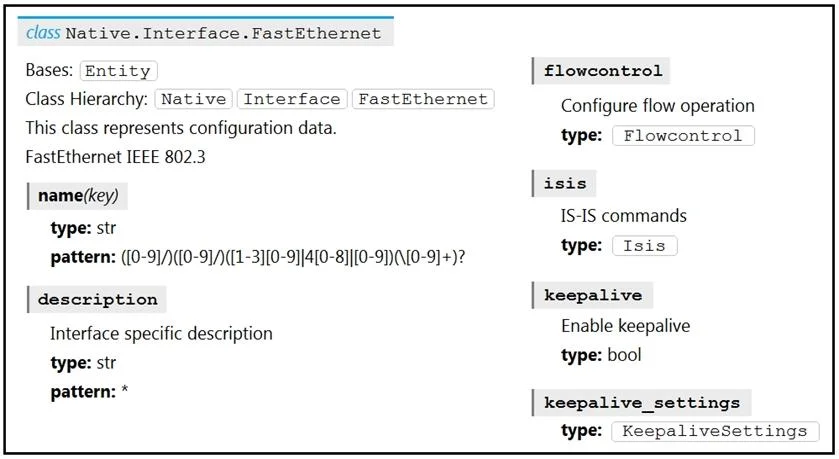
interface.keepalive = True- Reasoning: After creating the interface object and setting its 'name' (which is done in the next line of the provided code), the goal is to enable keepalive. The YDK documentation (Image 1) explicitly shows 'keepalive' as a boolean attribute directly under the 'FastEthernet' class. Setting
interface.keepalive = Trueenables this feature on the Python object.
- Reasoning: After creating the interface object and setting its 'name' (which is done in the next line of the provided code), the goal is to enable keepalive. The YDK documentation (Image 1) explicitly shows 'keepalive' as a boolean attribute directly under the 'FastEthernet' class. Setting
-
Blank 3:
interface_data = crud.read(provider, interface)- Reasoning: The subsequent
if interface_data:statement suggests that the script intends to verify the status of the keepalive setting. To do this, the script must read the current configuration from the network device. Thecrud.read()operation fetches the current state of the specified 'interface' from the 'provider' (the network device) and stores it ininterface_datafor evaluation.
- Reasoning: The subsequent
Common mistakes.
- common_mistake. A common mistake for Blank 1 would be to use
interface = model.Native.Interface(). This option is too general; while FastEthernet is an interface, the more specificFastEthernetclass must be instantiated to access its unique attributes likekeepalive.
For Blank 2, using interface.FastEthernet.keepalive_settings.keepalive = is incorrect. The interface variable is already an instance of model.Native.Interface.FastEthernet, so attempting to access interface.FastEthernet is redundant and syntactically wrong. Furthermore, the keepalive attribute is directly a boolean, as shown in the YDK documentation, not necessarily nested under keepalive_settings for a simple enable/disable.
For Blank 3, selecting interface_data = crud.update(provider, interface) would be incorrect in this context. While an update operation is typically needed to apply the interface.keepalive = True setting to the device, the if interface_data: condition explicitly checks the retrieved state. Therefore, crud.read() is the appropriate operation to fetch the current configuration for verification, rather than applying a configuration or getting a result of an update operation.
Concept tested. This question tests the understanding of YDK (YANG Development Kit) fundamentals, including instantiating YANG model objects in Python, setting configuration attributes on these objects, and performing CRUD (Create, Read, Update, Delete) operations, specifically the read operation, to retrieve and verify device configurations. It also assesses the ability to interpret YANG module documentation to understand object structures and attributes.
Topics
Community Discussion
No community discussion yet for this question.