
200-901 · Question #252
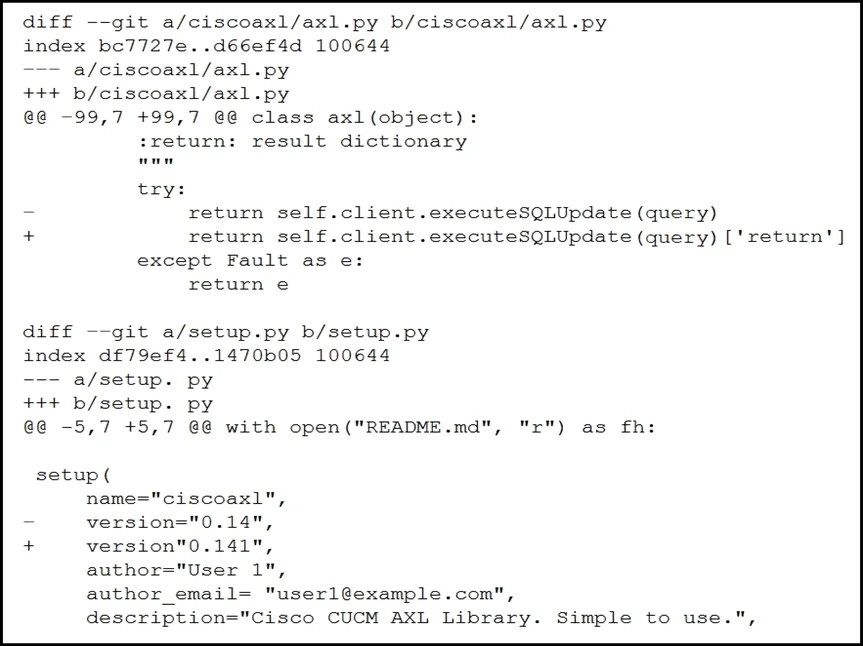
Refer to the exhibit. Which two files are being edited in the unified diff? (Choose two.)
The correct answer is B. setup.py C. axl.py. In a unified diff, the files being compared are identified by the --- and +++ header lines, which in this exhibit indicate setup.py and axl.py.
Question
Refer to the exhibit. Which two files are being edited in the unified diff? (Choose two.)
Exhibit
Options
- AREADME.md
- Bsetup.py
- Caxl.py
- Dciscoaxl.py
- Eindex.py
How the community answered
(56 responses)- A7% (4)
- B88% (49)
- D2% (1)
- E4% (2)
Why each option
In a unified diff, the files being compared are identified by the --- and +++ header lines, which in this exhibit indicate setup.py and axl.py.
README.md does not appear as a --- or +++ file header in the unified diff exhibit and is therefore not one of the files being compared.
In unified diff format, the '---' line identifies the original (old) version of a file being compared, and setup.py appears as one of those file headers in the exhibit.
The '+++' line in unified diff format identifies the new version of the file, and axl.py appears as the other file header in the diff output, confirming it is the second file being edited.
ciscoaxl.py does not appear as a file header in the unified diff; it may be referenced within diff content but is not one of the files being edited.
index.py does not appear as a --- or +++ file header in the unified diff exhibit and is not one of the files being compared.
Concept tested: Interpreting unified diff file headers
Source: https://www.gnu.org/software/diffutils/manual/diffutils.html#Unified-Format
Topics
Community Discussion
No community discussion yet for this question.