
200-901 · Question #244
Drag and Drop Question Refer to the exhibit. A Python script must delete all Cisco Catalyst 9300 Series switches that have an uptime that is greater than 90 days. The script must also query for the…
The correct answer is api_session.devices.get_device_list().response; api_session.devices.delete_device_by_id(device.id); api_session.devices.get_device_by_id(device.id); selected_device.response.inventoryStatusDetail. This question assesses the ability to use a Python SDK to interact with network devices, specifically for listing, deleting, and querying device status based on conditional logic.
Question
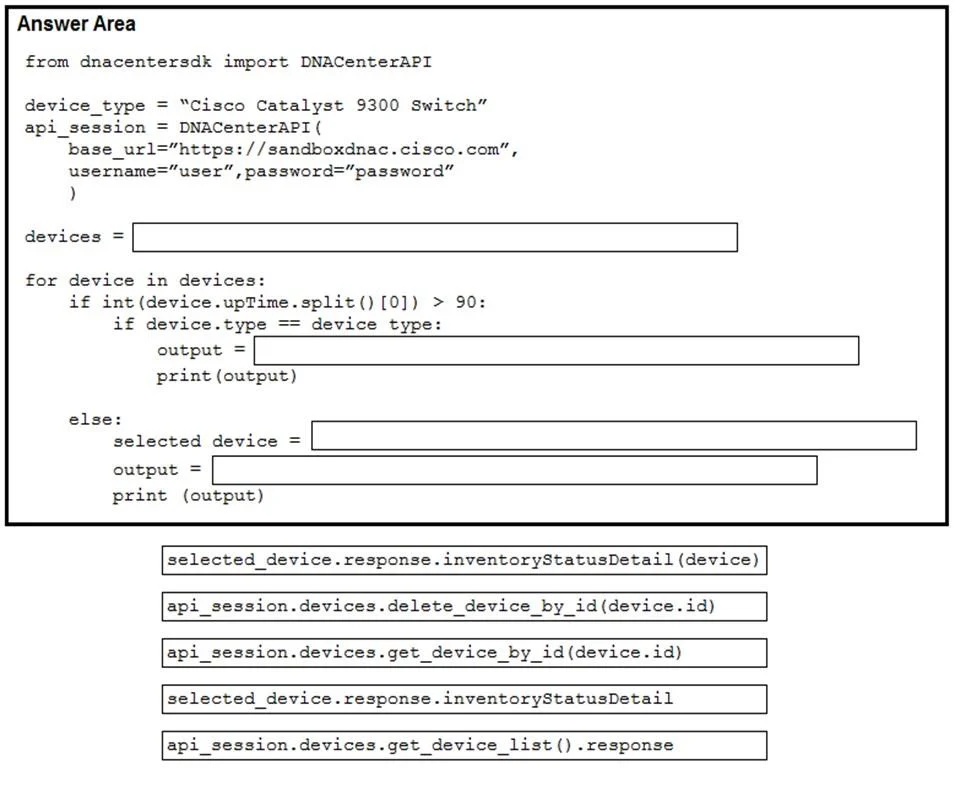
Drag and Drop Question Refer to the exhibit. A Python script must delete all Cisco Catalyst 9300 Series switches that have an uptime that is greater than 90 days. The script must also query for the status of all the other devices. Drag and drop the code from the bottom onto the box where the code is missing to complete the script. Not all options are used. Answer:
Exhibits
Answer Area
Drag items
Correct arrangement
- api_session.devices.get_device_list().response
- api_session.devices.delete_device_by_id(device.id)
- api_session.devices.get_device_by_id(device.id)
- selected_device.response.inventoryStatusDetail
Explanation
This question assesses the ability to use a Python SDK to interact with network devices, specifically for listing, deleting, and querying device status based on conditional logic.
Approach. The task requires a Python script to perform two main actions: delete specific switches and query the status of other devices. The SDK documentation guides the selection of the correct methods and attributes.
-
First Blank (
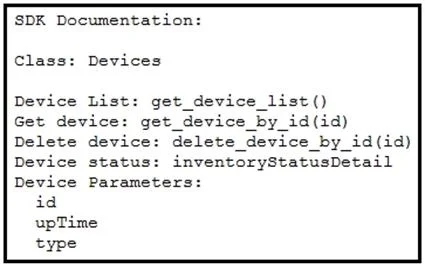
devices =): The script needs to retrieve a list of all devices to iterate through. According to the SDK documentation,Device List: get_device_list()is the method. The draggable optionapi_session.devices.get_device_list().responsecorrectly calls this method on theapi_sessionobject and accesses its.responseattribute, which typically holds the actual data from an API call. -
Second Blank (
output =within the 'if' block): This block is executed when a device is a 'Cisco Catalyst 9300 Switch' and itsupTimeis greater than 90 days. The requirement is to 'delete all Cisco Catalyst 9300 Series switches that have an uptime that is greater than 90 days'. The SDK documentation specifiesDelete device: delete_device_by_id(id). The draggable optionapi_session.devices.delete_device_by_id(device.id)correctly calls this method, passing theidof the currentdevicefrom the loop. -
Third Blank (
selected_device =within the 'else' block): This block handles 'other devices' (those not meeting the deletion criteria). The script needs to 'query for the status' of these devices. To get the status of a specific device, it's usually necessary to retrieve its detailed information first. The SDK documentation providesGet device: get_device_by_id(id). The draggable optionapi_session.devices.get_device_by_id(device.id)correctly retrieves the details of the currentdevice. -
Fourth Blank (
output =within the 'else' block): Afterselected_devicehas been populated with the device's details, the script needs to query its status. The SDK documentation indicatesDevice status: inventoryStatusDetail. This is listed as a status detail, suggesting it's an attribute of the device's response object. Theselected_devicevariable holds the response fromget_device_by_id. Therefore,selected_device.response.inventoryStatusDetailcorrectly accesses this attribute to get the device's status.
Common mistakes.
- common_mistake. 1. Incorrect interpretation of
inventoryStatusDetail: A common mistake would be to chooseselected_device.response.inventoryStatusDetail(device)for the fourth blank. The SDK documentation listsDevice status: inventoryStatusDetailwithout parentheses, implying it's an attribute, not a method. Passing(device)would be syntactically incorrect for an attribute and logically flawed asdevicein this context refers to the iterated item, not an argument expected by aninventoryStatusDetailcall on a specific device's response object.
- Swapping delete/get methods: Using
api_session.devices.get_device_by_id(device.id)instead ofdelete_device_by_idwhere deletion is required, or vice versa, would fail to meet the scenario requirements. - Missing
.response: For the first blank, simply usingapi_session.devices.get_device_list()without.responsemight return a wrapper object rather than the actual list of devices, leading to iteration errors. - Misunderstanding scope: Attempting to call
delete_device_by_idorget_device_by_iddirectly on adeviceobject from the loop instead of throughapi_session.deviceswould be incorrect, as these are methods of the SDK's device client, not the individual device object itself.
Concept tested. This question primarily tests the understanding and application of Python SDKs for network device automation and API interaction. Specifically, it covers:
- Using an SDK to perform CRUD (Create, Read, Update, Delete - specifically Read/List, Get by ID, Delete by ID) operations on network devices.
- Interpreting SDK documentation to correctly identify methods and attributes.
- Implementing conditional logic (if-else statements) to filter and act upon devices based on their properties.
- Basic Python syntax for loops, variable assignment, and string manipulation (
.split(),int()). - Understanding the structure of API responses, often requiring access to a
.responseattribute to get the actual data payload.
Topics
Community Discussion
No community discussion yet for this question.