
200-901 · Question #219
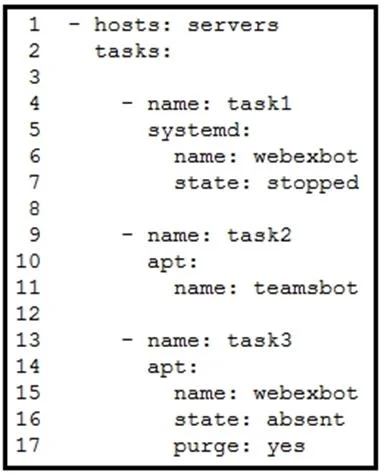
Refer to the exhibit. A developer must integrate a bot with an internal communication app. The developer wants to replace the webexbot package with the teamsbot package by using Ansible and prepares…
The correct answer is C. uninstalls the webexbot package and removes its configuration files. In Ansible, using state: absent with purge: yes for a package module uninstalls the specified package and also removes all associated configuration files, ensuring a clean removal.
Question
Refer to the exhibit. A developer must integrate a bot with an internal communication app. The developer wants to replace the webexbot package with the teamsbot package by using Ansible and prepares a playbook. In the first two tasks, the playbook stops the webexbot and verifies that the teamsbot is installed. What is accomplished in the last task of the workflow when the developer runs the Ansible playbook?
Exhibit
Options
- Astops the webexbot service and uninstals it and retains its configuration files
- Binstalls the webexbot and retains the configuration files
- Cuninstalls the webexbot package and removes its configuration files
- Dsearches whether the purge package is available in the repository and uninstalls the webexbot
How the community answered
(25 responses)- B4% (1)
- C88% (22)
- D8% (2)
Why each option
In Ansible, using `state: absent` with `purge: yes` for a package module uninstalls the specified package and also removes all associated configuration files, ensuring a clean removal.
This option incorrectly states that configuration files are retained; the `purge: yes` argument is specifically used to remove them.
This option describes installing `webexbot` and retaining files, which is the opposite of the goal (replacing it) and the effect of `state: absent, purge: yes`.
When using an Ansible package module (like `apt` or `yum`) with `state: absent` and `purge: yes`, the module not only uninstalls the specified package (e.g., `webexbot`) but also thoroughly removes all associated configuration files. This ensures a complete cleanup before installing a replacement package like `teamsbot`.
The playbook directly uninstalls and purges the package; it does not first search for the `purge` package or its availability in the repository, as `purge` is a parameter of the package module itself.
Concept tested: Ansible package management - uninstalling with purge
Source: https://docs.ansible.com/ansible/latest/collections/ansible/builtin/apt_module.html
Topics
Community Discussion
No community discussion yet for this question.