
200-901 · Question #163
Drag and Drop Question Drag and Drop the GIT commands from the left onto the right that add modified local files to a remote repository. Not all options are used Answer:
The correct answer is git add .; git commit -m "this is my edit"; git push. To add modified local files to a remote repository, the correct sequence of Git commands involves staging the changes, committing them locally, and then pushing the local commits to the remote repository.
Question
Exhibit
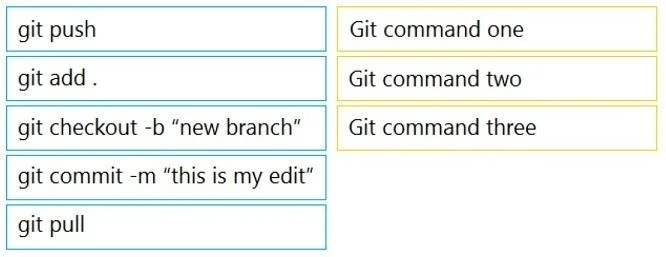
Answer Area
Drag items
Correct arrangement
- git add .
- git commit -m "this is my edit"
- git push
Explanation
To add modified local files to a remote repository, the correct sequence of Git commands involves staging the changes, committing them locally, and then pushing the local commits to the remote repository.
Approach. The question asks for the sequence of Git commands to add modified local files to a remote repository. This involves a standard Git workflow comprising three main steps: staging, committing, and pushing.
-
Git command one:
git add .- Interaction: Drag 'git add .' to the 'Git command one' slot.
- Reasoning: After modifying local files, the first step is to stage these changes. The
git add .command stages all new and modified files in the current directory, preparing them for the next commit. This moves the changes from the working directory to the staging area.
-
Git command two:
git commit -m "this is my edit"- Interaction: Drag 'git commit -m "this is my edit"' to the 'Git command two' slot.
- Reasoning: Once changes are staged, they need to be committed to the local repository. The
git commit -m "message"command creates a snapshot of the staged changes and records it in the local repository's history, along with a descriptive message. This moves the changes from the staging area to the local repository.
-
Git command three:
git push- Interaction: Drag 'git push' to the 'Git command three' slot.
- Reasoning: After the changes are committed locally, the final step to get them into the remote repository is to push them. The
git pushcommand uploads the local repository's commits to the designated remote repository, typically 'origin' and the current branch.
Common mistakes.
- common_mistake. A common mistake would be to include commands that are not part of the core 'add modified files to remote' workflow or to place the commands in an incorrect order.
git checkout -b "new branch": This command is used to create a new branch and switch to it. While branching is an important Git concept, it is not a direct step in the process of adding already modified files to a remote repository. It's a preparatory step for feature development, not for committing and pushing existing changes.git pull: This command is used to fetch changes from a remote repository and integrate them into the current local branch. It's the inverse ofgit pushand is used to receive updates from the remote, not to send local updates to the remote.- Incorrect order (e.g., commit before add, push before commit): The sequence
add -> commit -> pushis fundamental. Committing before adding would result in an empty commit or commit only previously staged changes. Pushing before committing local changes would push older commits or nothing new, as the recent local modifications wouldn't have been recorded in the local repository yet.
Concept tested. The core concept being tested is the fundamental Git workflow for synchronizing local changes with a remote repository, specifically the stages of modifying files, staging changes, committing to the local repository, and pushing to a remote repository. This assesses understanding of the Git life cycle: Working Directory -> Staging Area -> Local Repository -> Remote Repository.
Topics
Community Discussion
No community discussion yet for this question.