
200-401 · Question #1
Drag and Drop Question Answer:
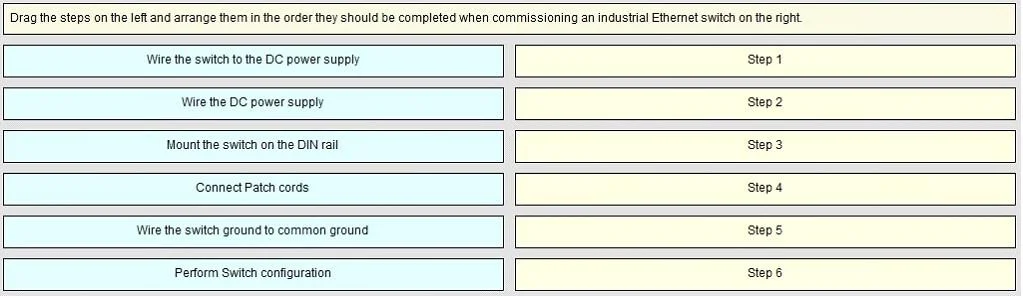
The correct answer is Mount the switch on the DIN rail; Wire the switch to the DC power supply; Wire the switch ground to common ground; Perform Switch configuration; Connect Patch cords. Switch Installation & Commissioning - Step Order Explained Overview This sequence follows the universal principle of physical → electrical → logical → network when commissioning industrial/managed switches mounted in a panel or enclosure. --- Step-by-Step Breakdown 1. Mount the…
Question
Drag and Drop Question Answer:
Exhibit
Answer Area
Drag items
Correct arrangement
- Mount the switch on the DIN rail
- Wire the switch to the DC power supply
- Wire the switch ground to common ground
- Perform Switch configuration
- Connect Patch cords
Explanation
Switch Installation & Commissioning - Step Order Explained
Overview
This sequence follows the universal principle of physical → electrical → logical → network when commissioning industrial/managed switches mounted in a panel or enclosure.
Step-by-Step Breakdown
1. Mount the switch on the DIN rail
Why first: Physical installation is always the prerequisite for everything else. You cannot safely wire or configure a device that isn't secured. DIN rail mounting also establishes the switch's final position, which determines cable routing and reach.
2. Wire the switch to the DC power supply
Why second: Once physically secured, you make the DC power input connections (typically +V and 0V/negative terminals). Power wiring comes before grounding because you're connecting the supply conductors first - the next step then ties the chassis to a safety reference.
3. Wire the switch ground to common ground
Why third: The chassis/earth ground bond is completed after the power conductors are landed. This ensures the switch has a proper safety ground before any configuration or live traffic occurs. Grounding before power-on is a safety and EMC requirement.
Common misconception: Some assume ground should be wired before the DC supply connections. In practice, the order of steps 2 and 3 matters less than ensuring both are done before powering on - but this sequence reflects standard wiring documentation conventions.
4. Perform Switch configuration
Why fourth: Configuration (VLANs, port settings, management IP, STP, etc.) is done before connecting network cables. This prevents the switch from participating in the live network in an unconfigured state, which can cause broadcast storms, spanning tree issues, or security gaps.
5. Connect Patch cords
Why last: Patch cords are connected only after the switch is powered, grounded, and fully configured. This is the "go live" step - connecting cables to a pre-configured switch ensures the network behaves predictably from the first packet.
The Distractor Item
"Wire the DC power supply" (not in the correct sequence) refers to wiring the power supply unit itself - a prerequisite task assumed to be already complete before this procedure begins. It is a deliberate distractor testing whether you conflate wiring the supply with wiring the switch to the supply.
Summary Rule
Mount → Power → Ground → Configure → Connect
Never connect patch cords to an unconfigured switch, and never skip grounding before power-on.
Topics
Community Discussion
No community discussion yet for this question.