
200-301 · Question #919
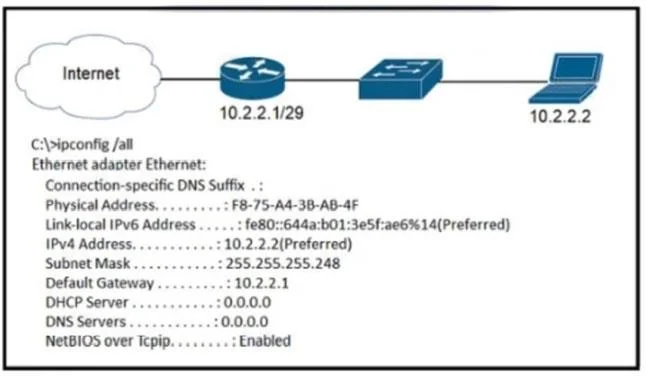
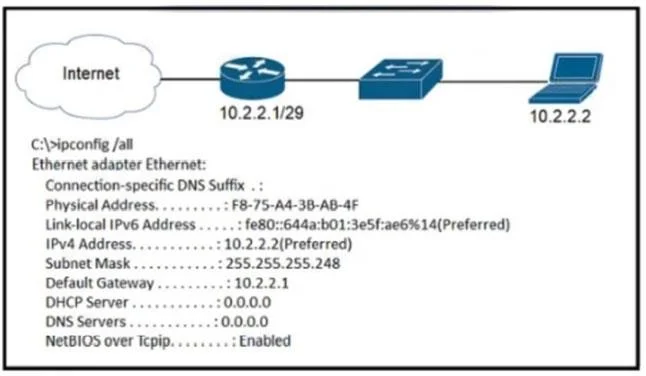
Refer to the exhibit. A newly configured PC fails to connect to the internet by using TCP port 80 to
The correct answer is B. DNS Servers. A common cause for a PC's failure to connect to internet services via hostname (like web browsing on port 80) is an issue with its DNS server configuration.
Question
Refer to the exhibit. A newly configured PC fails to connect to the internet by using TCP port 80 to
Exhibits
Options
- ASubnet Mask
- BDNS Servers
- CDefault Gateway
- DDHCP Servers
How the community answered
(61 responses)- A26% (16)
- B56% (34)
- C5% (3)
- D13% (8)
Why each option
A common cause for a PC's failure to connect to internet services via hostname (like web browsing on port 80) is an issue with its DNS server configuration.
An incorrect subnet mask might cause local or gateway connectivity issues, but DNS is more specifically related to hostname-based service access if an IP address is already obtained.
If a newly configured PC cannot connect to the internet using TCP port 80, implying web browsing, the most common reason, assuming basic IP connectivity, is that the DNS servers are incorrectly configured or missing. This prevents the PC from resolving website hostnames to IP addresses, thereby stopping the connection.
A missing default gateway would prevent *any* communication outside the local subnet. While critical, DNS is the specific service preventing name-based access.
DHCP servers provide IP configuration. If the PC has an IP address and is newly configured, the DHCP server has likely already done its job, or the configuration is static. This isn't the direct cause of a specific port 80 failure if an IP is present.
Concept tested: DNS role in internet connectivity
Source: https://learn.microsoft.com/en-us/windows-server/networking/dns/what-is-dns
Topics
Community Discussion
No community discussion yet for this question.