
200-301 · Question #855
Drag and Drop Question Drag and drop the Wi-Fi terms from the left onto the descriptions on the right. Answer:
The correct answer is extended service set; independent basic service set; infrastructure mode; SSID; distribution system. Wi-Fi Terms - Drag & Drop Explained Since the descriptions aren't shown, here's what each numbered slot most likely describes, and why the term fits: --- 1. Extended Service Set (ESS) Description slot: A network formed by multiple access points (APs) connected together…
Question
Exhibit
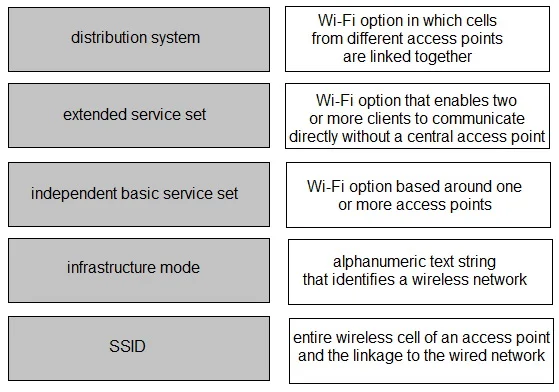
Answer Area
Drag items
Correct arrangement
- extended service set
- independent basic service set
- infrastructure mode
- SSID
- distribution system
Explanation
Wi-Fi Terms - Drag & Drop Explained
Since the descriptions aren't shown, here's what each numbered slot most likely describes, and why the term fits:
1. Extended Service Set (ESS)
Description slot: A network formed by multiple access points (APs) connected together, enabling seamless roaming across a larger area.
Why it fits: An ESS is the "big picture" network - multiple Basic Service Sets (BSSs) joined via a distribution system. It's the highest-level Wi-Fi topology term in this list.
Common mistake: Confusing ESS with BSS. A BSS is a single AP + its clients; an ESS chains multiple BSSs together.
2. Independent Basic Service Set (IBSS)
Description slot: A peer-to-peer (ad-hoc) network where devices communicate directly without an access point.
Why it fits: IBSS = ad-hoc mode. No AP is involved - devices form a temporary, self-contained network. The word "independent" signals no infrastructure dependency.
Common mistake: Thinking IBSS still uses an AP. It explicitly does not - that's what makes it "independent."
3. Infrastructure Mode
Description slot: A wireless configuration where clients connect through a central access point.
Why it fits: Infrastructure mode is the counterpart to ad-hoc (IBSS). It describes the standard home/enterprise setup where all traffic flows through an AP. It's a mode, not a topology name.
Common mistake: Confusing infrastructure mode with ESS. Infrastructure mode simply means "uses an AP" - ESS is a specific multi-AP topology built on top of it.
4. SSID
Description slot: The human-readable name that identifies a wireless network.
Why it fits: SSID (Service Set Identifier) is literally the network name you see in your device's Wi-Fi list (e.g., "HomeNetwork_5G"). It's an identifier, not a topology or architecture concept.
Common mistake: Thinking the SSID is unique per AP. In an ESS, multiple APs intentionally share the same SSID so clients can roam transparently.
5. Distribution System
Description slot: The backbone (typically wired Ethernet) that interconnects multiple access points within an ESS.
Why it fits: The distribution system is the "glue" of an ESS - it routes traffic between APs and to the wider network. Without it, multiple APs can't coordinate.
Common mistake: Assuming the distribution system must be wired. The 802.11 standard allows wireless distribution systems (WDS), though wired is most common.
Key Relationships to Remember
IBSS          = ad-hoc, no AP, peer-to-peer
Infrastructure mode = uses an AP (the normal setup)
BSS           = one AP + its clients
ESS           = multiple BSSs linked via a distribution system
SSID          = the name visible to users across the whole ESS
Distribution system = the wired/wireless backbone tying APs together
Topics
Community Discussion
No community discussion yet for this question.