
200-301 · Question #583
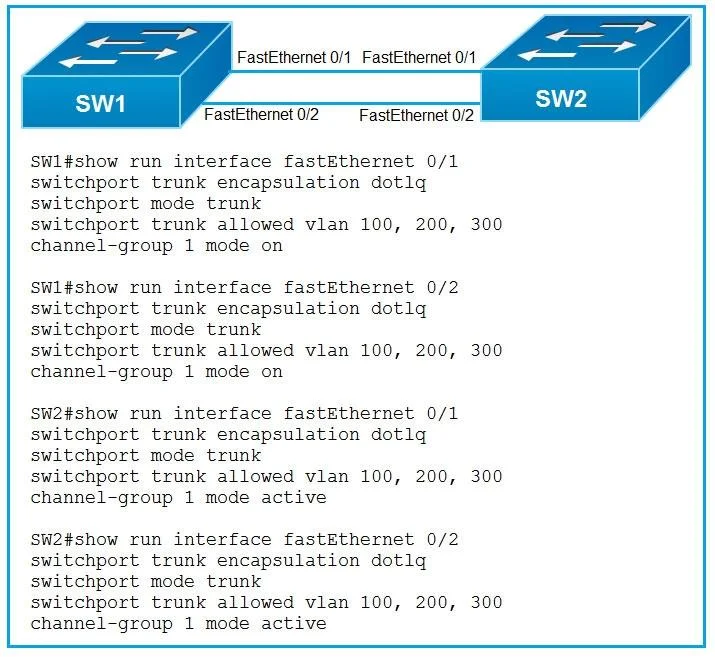
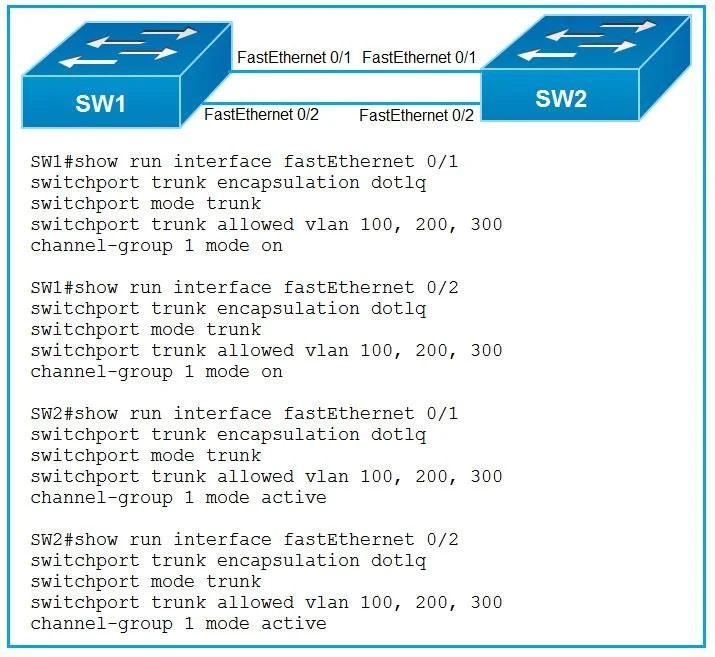
Refer to the exhibit. An engineer built a new L2 LACP EtherChannel between SW1 and SW2 and executed these show commands to verify the work. Which additional task allows the two switches to establish…
The correct answer is D. Change the channel-group mode on SW1 to active or passive. To establish an LACP port channel, both connected switches must have their physical interfaces configured with compatible LACP modes, ensuring at least one side is in active mode to initiate negotiation.
Question
Refer to the exhibit. An engineer built a new L2 LACP EtherChannel between SW1 and SW2 and executed these show commands to verify the work. Which additional task allows the two switches to establish an LACP port channel?
Exhibits
Options
- AChange the channel-group mode on SW2 to auto
- BChange the channel-group mode on SW1 to desirable.
- CConfigure the interface port-channel 1 command on both switches.
- DChange the channel-group mode on SW1 to active or passive.
How the community answered
(50 responses)- A12% (6)
- B6% (3)
- C26% (13)
- D56% (28)
Why each option
To establish an LACP port channel, both connected switches must have their physical interfaces configured with compatible LACP modes, ensuring at least one side is in active mode to initiate negotiation.
Changing SW2 to `auto` would configure PAgP (Port Aggregation Protocol), which is incompatible with LACP EtherChannel.
Changing SW1 to `desirable` would configure PAgP, which is incompatible with LACP EtherChannel.
The `interface port-channel` command typically defines the logical interface itself, which is a prerequisite for EtherChannel, but the issue here is with the negotiation `mode` on the physical interfaces.
If SW1 is currently configured with an incompatible mode (e.g., `on`, PAgP `desirable`/`auto`, or `passive` while SW2 is also `passive`), changing its channel-group mode to `active` or `passive` is necessary for the LACP EtherChannel to successfully negotiate and form with SW2.
Concept tested: LACP EtherChannel negotiation modes
Source: https://www.cisco.com/c/en/us/td/docs/switches/lan/catalyst3850/software/release/3se/layer2/configuration_guide/b_layer2_3se_3850_cg/b_layer2_3se_3850_cg_chapter_0100.html
Topics
Community Discussion
No community discussion yet for this question.