
200-301 · Question #531
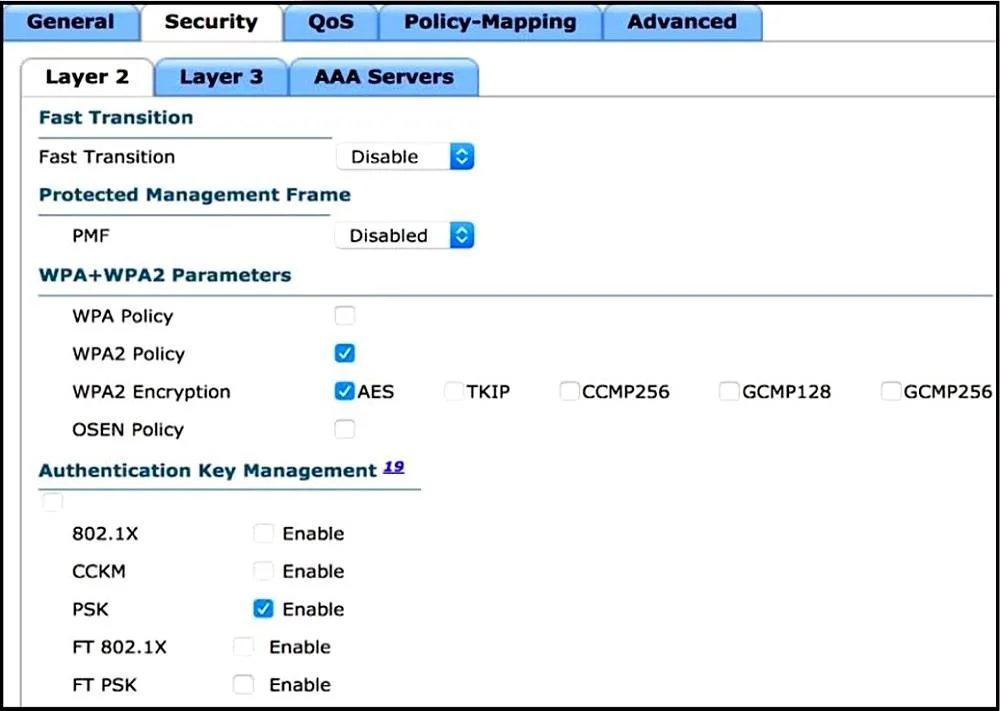
Refer to the exhibit. Users need to connect to the wireless network with IEEE 802. 11r-compatible devices. The connection must be maintained as users travel between floors or to other areas in the…
The correct answer is C. Enable Fast Transition and select the FT 802.1x option. To enable 802.11r compatible devices to roam seamlessly in an enterprise, Fast Transition with 802.1x authentication should be configured.
Question
Refer to the exhibit. Users need to connect to the wireless network with IEEE 802. 11r-compatible devices. The connection must be maintained as users travel between floors or to other areas in the building. What must be the configuration of the connection?
Exhibits
Options
- ASelect the WPA Policy option with the CCKM option.
- BDisable AES encryption.
- CEnable Fast Transition and select the FT 802.1x option.
- DEnable Fast Transition and select the FT PSK option.
How the community answered
(21 responses)- A10% (2)
- B5% (1)
- C81% (17)
- D5% (1)
Why each option
To enable 802.11r compatible devices to roam seamlessly in an enterprise, Fast Transition with 802.1x authentication should be configured.
CCKM is a Cisco proprietary fast roaming solution that is older than and typically superseded by the standardized 802.11r Fast Transition.
To meet the requirements for IEEE 802.11r-compatible devices to maintain connections while roaming, enabling Fast Transition (the common term for 802.11r) and selecting the FT 802.1x option provides the necessary fast roaming capabilities combined with robust enterprise-grade authentication.
Concept tested: 802.11r (Fast BSS Transition) with 802.1x
Source: https://www.cisco.com/c/en/us/td/docs/wireless/controller/8-5/config-guide/b_cg85/802_11r_config.html
Topics
Community Discussion
No community discussion yet for this question.