
200-301 · Question #310
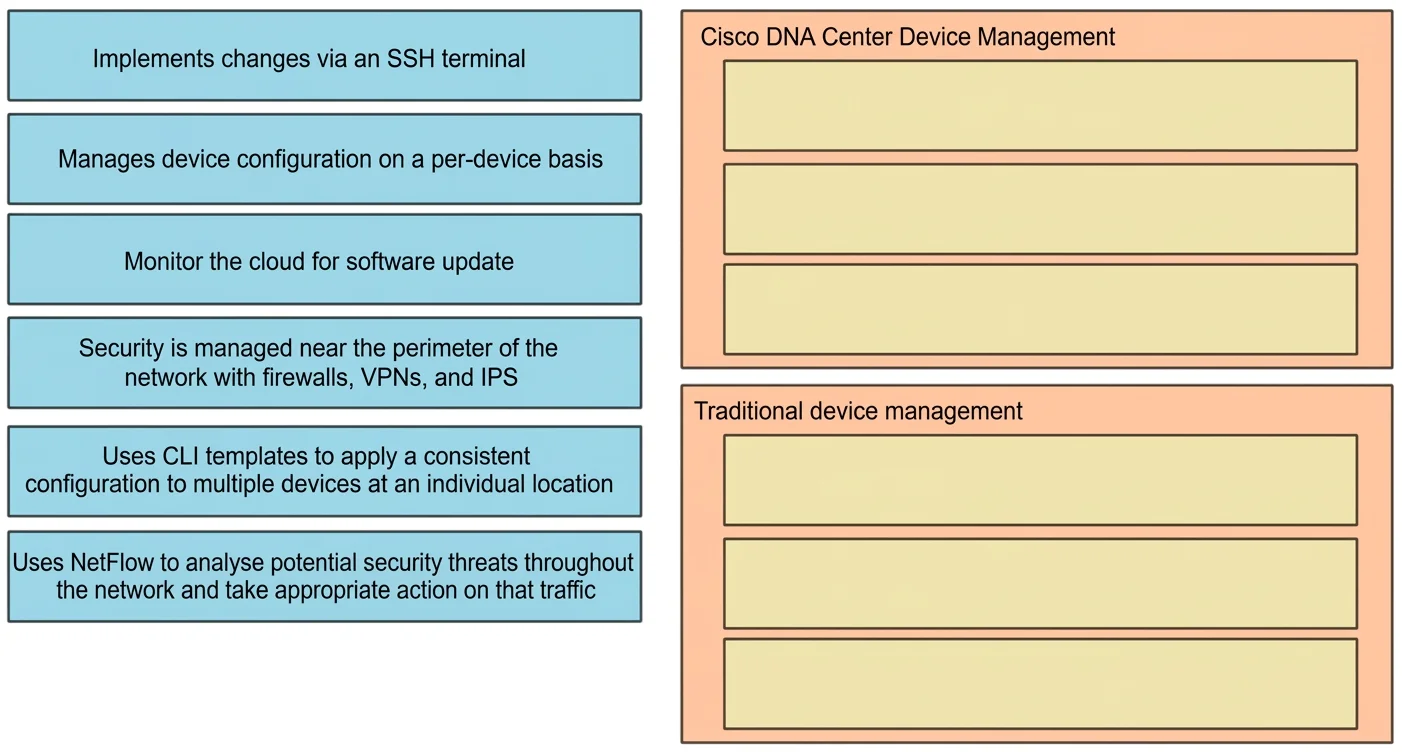
Drag and Drop Question Drag the descriptions of device management from the left onto the types of device management on the right. Answer:
The correct answer is Monitor the cloud for software update; Uses CLI templates to apply a consistent configuration to multiple devices at an individual location; Uses NetFlow to analyze potential security threats throughout the network and take appropriate action on that traffic; Implements changes via an SSH terminal; Manages device configuration on a per-device basis; Security is managed near the perimeter of the network with firewalls, VPNs, and IPS. Device Management Drag-and-Drop Explanation Note: The question maps descriptions to management types, but the type labels aren't shown in what you provided. Based on the items themselves, here's the standard networking framework they align with (common in CCNA/Cisco…
Question
Exhibit
Answer Area
Drag items
Correct arrangement
- Monitor the cloud for software update
- Uses CLI templates to apply a consistent configuration to multiple devices at an individual location
- Uses NetFlow to analyze potential security threats throughout the network and take appropriate action on that traffic
- Implements changes via an SSH terminal
- Manages device configuration on a per-device basis
- Security is managed near the perimeter of the network with firewalls, VPNs, and IPS
Explanation
Device Management Drag-and-Drop Explanation
Note: The question maps descriptions to management types, but the type labels aren't shown in what you provided. Based on the items themselves, here's the standard networking framework they align with (common in CCNA/Cisco curriculum):
Item-by-Item Breakdown
Position 1 - "Monitor the cloud for software update" -> Cloud-managed device management Monitoring the cloud for updates is the defining trait of cloud-managed solutions (e.g., Cisco Meraki). The controller is cloud-hosted, so devices phone home to it for firmware/config updates. Not applicable to on-prem or traditional CLI models.
Position 2 - "Uses CLI templates to apply a consistent configuration to multiple devices at an individual location" -> Centralized / Campus management CLI templates push standardized configs to many devices from one place, which is characteristic of centralized or campus-level management (e.g., Cisco DNA Center). The key signal is consistency across multiple devices at a single site.
Common mistake: Confusing this with per-device management. Templates imply bulk/centralized, not individual device work.
Position 3 - "Uses NetFlow to analyze potential security threats throughout the network and take appropriate action on that traffic" -> SDN / Network-wide (distributed) security management NetFlow exports traffic metadata network-wide for analysis - this is a network-level visibility tool, not a perimeter tool. Acting on that traffic inline is characteristic of SDN or network-based security (e.g., Cisco Stealthwatch/Secure Network Analytics).
Common mistake: Confusing this with perimeter security. NetFlow operates throughout the network, not just at the edge.
Position 4 - "Implements changes via an SSH terminal" -> Traditional CLI-based management SSH terminal access is the classic hands-on, engineer-driven method. Changes are made manually, one session at a time. No automation, no templates, no cloud.
Position 5 - "Manages device configuration on a per-device basis" -> On-device / Traditional on-premises management Per-device configuration means each device is managed individually - no centralized controller, no templates. This describes legacy on-prem management where every router/switch is configured independently.
Common mistake: Conflating this with SSH (Position 4). SSH is the method; per-device management is the model. You can use SSH per-device, but the category here is about the scope of management.
Position 6 - "Security is managed near the perimeter of the network with firewalls, VPNs, and IPS" -> Perimeter-based security model Firewalls, VPNs, and IPS at the network edge define classic perimeter security - trust everything inside, inspect/block at the boundary. This contrasts with the distributed NetFlow approach in Position 3, which monitors inside the network too.
Common mistake: Mixing up Position 3 and Position 6. The key distinction:
- Position 3 = security throughout the network using traffic analysis (NetFlow)
- Position 6 = security at the edge using enforcement devices (firewall/VPN/IPS)
Summary Table
| # | Description (abbreviated) | Management Type |
|---|---|---|
| 1 | Cloud software updates | Cloud-managed |
| 2 | CLI templates, multiple devices | Centralized/Campus |
| 3 | NetFlow threat analysis | SDN/Network-wide security |
| 4 | SSH terminal changes | Traditional CLI |
| 5 | Per-device configuration | On-device/Legacy |
| 6 | Firewalls, VPNs, IPS at perimeter | Perimeter security |
Topics
Community Discussion
No community discussion yet for this question.