
200-301 · Question #1773
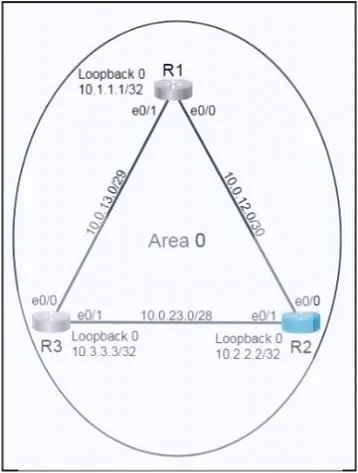
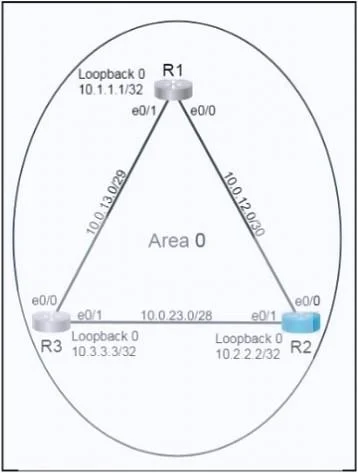
SIMULATION 70 Please use the "Tasks" and "Topology" tabs to complete this lablet. Topology Tasks Configure OSPF routing for the network by completing the following tasks: Task 1 Configure OSPF on…
OSPF Configuration on R2 - Explained Overall Goal R2 sits between R1 and R3, so it must run OSPF to share routing information with both neighbors. The three objectives are: 1. Bring up OSPF adjacencies with R1 and R3 2. Advertise only the two required subnets 3. Guarantee R2…
Question
Exhibits
Explanation
OSPF Configuration on R2 - Explained
Overall Goal
R2 sits between R1 and R3, so it must run OSPF to share routing information with both neighbors. The three objectives are:
- Bring up OSPF adjacencies with R1 and R3
- Advertise only the two required subnets
- Guarantee R2 wins the DR election on both segments
Step-by-Step Breakdown
Step 1 - conf t
Enters global configuration mode. All subsequent commands require this context.
Steps 2-3 - Configure Loopback0
interface Loopback0
ip address 10.2.2.2 255.255.255.255
A loopback interface is always up and never tied to physical link state. Using it as the router ID ensures OSPF stability - if a physical interface goes down, the router ID doesn't change and adjacencies aren't unnecessarily torn down. The /32 mask is standard for loopbacks used as router IDs.
If skipped: OSPF would still elect a router ID, but it would pick the highest active interface IP at startup, which can change unpredictably. The task explicitly requires Lo0 as the router ID.
Steps 4-6 - Configure e0/0 (link to R1)
interface e0/0
ip address 10.0.12.2 255.255.255.252
ip ospf priority 255
/30(255.255.255.252) matches the 10.0.12.0/30 prefix - only 2 usable hosts, correct for a point-to-point-style link.ip ospf priority 255sets the highest possible OSPF election priority (range 0-255, default 1). The router with the highest priority on a segment wins the DR election.
If priority is skipped: R2 might lose the DR election to R1 or R3. A priority of 0 would make R2 ineligible entirely; the default of 1 leaves it to chance based on router ID tiebreaking.
Steps 7-9 - Configure e0/1 (link to R3)
interface e0/1
ip address 10.0.23.2 255.255.255.240
ip ospf priority 255
/28(255.255.255.240) matches the 10.0.23.0/28 prefix - 14 usable hosts.- Priority 255 applied here for the same DR election reason on the R2-R3 segment.
If skipped on this interface but not e0/0: R2 would be DR toward R1 but might not be DR toward R3, violating Task 2.
Steps 10-11 - Start OSPF process and set router ID
router ospf 10
router-id 10.2.2.2
- Process ID 10 is locally significant only (doesn't need to match R1/R3), but must match the task requirement.
router-id 10.2.2.2explicitly pins the router ID to the Loopback0 address. Without this command, even if Lo0 exists, OSPF might not use it if another interface has a higher IP.
If router-id is omitted: OSPF auto-selects - typically the highest loopback IP, but this is not guaranteed. The explicit command is always safer and required here.
Steps 12-13 - Advertise specific prefixes
network 10.0.12.0 0.0.0.3 area 0
network 10.0.23.0 0.0.0.15 area 0
The network command uses a wildcard mask (inverse of subnet mask):
/30-> subnet mask255.255.255.252-> wildcard0.0.0.3/28-> subnet mask255.255.255.240-> wildcard0.0.0.15
These commands tell OSPF to enable itself on any interface whose IP falls within that range, and to advertise those networks into area 0.
Common mistake: Using the subnet mask instead of the wildcard mask - 0.0.0.252 instead of 0.0.0.3. That would either match nothing or match unintended interfaces.
If only one network is advertised: The neighbor relationship on the other segment won't form, so either R1 or R3 would never become an OSPF neighbor.
Step 14 - end
Exits configuration mode and returns to privileged EXEC. Good practice to follow with write memory or copy run start to persist the config - though not required by the task.
Why This Order Matters
Interface IPs must be configured before the router ospf process activates OSPF on those interfaces. If you enter the network statements before assigning IPs, OSPF may not match the interfaces correctly (or will match them once IPs are added, but the priority commands need to be in place first for the DR election).
Memory Tip
"Loop before OSPF, Priority before Network"
- Configure the Loopback first (stable router ID)
- Set priority on each interface (DR insurance)
- Then start the OSPF process and add network statements
For wildcard masks: subtract each octet of the subnet mask from 255.
255 - 252 = 3-> wildcard for /30 is0.0.0.3255 - 240 = 15-> wildcard for /28 is0.0.0.15
Topics
Community Discussion
No community discussion yet for this question.