
200-301 · Question #1756
Lab Simulation 64 Please use the "Tasks" and "Topology" tabs to complete this lablet. Topology Tasks Refer to the topology. All physical cabling is in place. Routers R2 and R3 are inaccessible…
OSPF Configuration Lab - Deep Explanation Overall Goal You're configuring OSPF (Open Shortest Path First) on R1 so that it forms neighbor relationships with R2 and R3, and ensures R1 always wins the Designated Router (DR) election on all shared links. OSPF requires careful…
Question
Exhibits
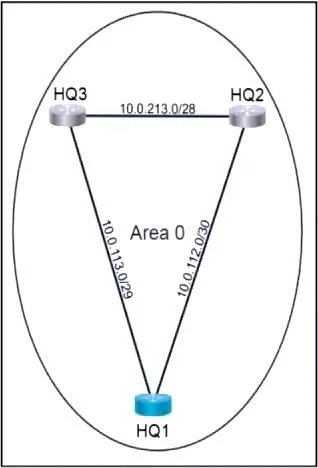
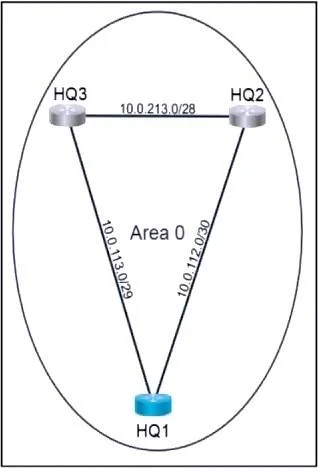
Explanation
OSPF Configuration Lab - Deep Explanation
Overall Goal
You're configuring OSPF (Open Shortest Path First) on R1 so that it forms neighbor relationships with R2 and R3, and ensures R1 always wins the Designated Router (DR) election on all shared links. OSPF requires careful setup: a stable router ID, correct network advertisements, and priority tuning for DR control.
Why This Approach Is Correct
OSPF on Cisco IOS has three distinct configuration layers:
- Process + Router ID - identifies R1 uniquely in the OSPF domain
- Network statements - tells OSPF which interfaces to activate and advertise
- Interface priority - controls who wins the DR election on multiaccess segments
Skipping any layer breaks a different part of the protocol.
Step-by-Step Reasoning
Steps 1–4 - Configure Loopback0
conf t
interface Loopback0
ip address 10.0.1.1 255.255.255.255
A Loopback interface is a virtual, always-up interface. OSPF uses it as the router ID because physical interfaces can go down. If you use a physical interface IP as the router ID and that interface flaps, OSPF adjacencies reset across the entire router. The /32 mask (255.255.255.255) is standard for loopbacks - it means "exactly this host, nothing else."
Skip consequence: Without Loopback0, OSPF would auto-select a router ID from an active physical interface, which could change unpredictably and cause adjacency instability.
Steps 5–6 - Start OSPF process and set router ID
router ospf 111
router-id 10.0.1.1
router ospf 111 creates the OSPF process. The process ID (111) is locally significant - R2 and R3 can run different process IDs and still neighbor with R1. However, the lab requires 111 specifically, so deviating fails the graded check.
router-id manually pins the router ID to the Loopback0 IP. Without this, Cisco auto-selects the highest IP among active loopbacks, or the highest physical IP if no loopback exists. Manual assignment removes ambiguity and survives interface changes.
Skip consequence: If
router-idis omitted, OSPF auto-selects one - which might still work, but is non-deterministic and fails the lab's explicit requirement.
Steps 7–9 - Network statements with wildcard masks
network 10.0.112.0 0.0.0.3 area 0
network 10.0.113.0 0.0.0.7 area 0
network 10.0.1.1 0.0.0.0 area 0
The network command activates OSPF on any interface whose IP falls within the specified range. The second argument is a wildcard mask (inverted subnet mask), not a subnet mask.
| Prefix | Subnet Mask | Wildcard Mask | Logic |
|---|---|---|---|
| /30 | 255.255.255.252 | 0.0.0.3 | Matches 4 addresses |
| /29 | 255.255.255.248 | 0.0.0.7 | Matches 8 addresses |
| /32 | 255.255.255.255 | 0.0.0.0 | Matches exactly 1 address |
The wildcard rule: 0 bits = must match, 1 bits = don't care. So 0.0.0.3 means "match the first 30 bits exactly" - precisely a /30.
Using a broader wildcard (e.g., 0.0.0.255) would still work for adjacency but would advertise an imprecise prefix. The lab explicitly requires matching exact prefixes, so wildcard precision matters.
Skip consequence: If a network statement is missing for a link (e.g., the R3 link), OSPF won't activate on that interface and R3 will never form a neighbor relationship with R1.
Steps 11–16 - Set OSPF priority 255 on e0/0 and e0/1
interface e0/0
ip ospf priority 255

interface e0/1
ip ospf priority 255
On multiaccess networks (Ethernet segments with multiple routers), OSPF elects a Designated Router (DR) to reduce flooding overhead. Instead of every router flooding to every other (O(n²) LSA traffic), all routers sync with the DR only.
DR election rules:
- Highest OSPF interface priority wins (default is 1; range 0–255)
- Tie-break: highest router ID
- Priority 0 = ineligible to become DR
Setting priority to 255 (the maximum) guarantees R1 wins regardless of what priority R2 or R3 have. You need this on each interface separately because priority is a per-interface setting - configuring it under router ospf doesn't exist.
Skip consequence: With default priority 1, R2 or R3 could win the DR election if their router IDs are higher. The lab requirement fails. Also note: DR elections are non-preemptive - if R2 or R3 already became DR before you set priority, you'd need to reset the OSPF process to force a new election.
What Would Go Wrong If Steps Are Out of Order
- Setting
router-idafter neighbors form: OSPF ignores the new router ID until the process is cleared (clear ip ospf process). The old ID persists. - Setting interface priority after DR election: The election is already done. The new priority only takes effect after the next election (triggered by a neighbor going down/up or process reset).
- Advertising networks before
router-id: OSPF will auto-assign an ID immediately when the firstnetworkstatement activates an interface. If Loopback0 wasn't up yet, it picks a physical IP instead.
Memory Tips
Wildcard mask shortcut: Subtract the subnet mask from 255.255.255.255.
- /30 → 255.255.255.252 → wildcard =
0.0.0.3 - /29 → 255.255.255.248 → wildcard =
0.0.0.7 - /32 → 255.255.255.255 → wildcard =
0.0.0.0
DR priority mnemonic: "255 = I'm always the boss." Priority 0 means "I refuse to be DR." Any value in between is a vote weight.
Loopback = stability anchor: Always configure the loopback before starting the OSPF process, so the router ID is set from a stable source before any adjacencies form.
Topics
Community Discussion
No community discussion yet for this question.