
Cisco
200-301 · Question #1711
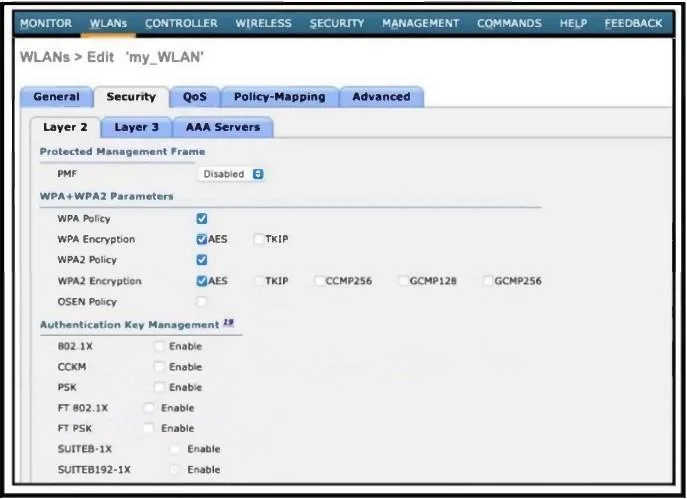
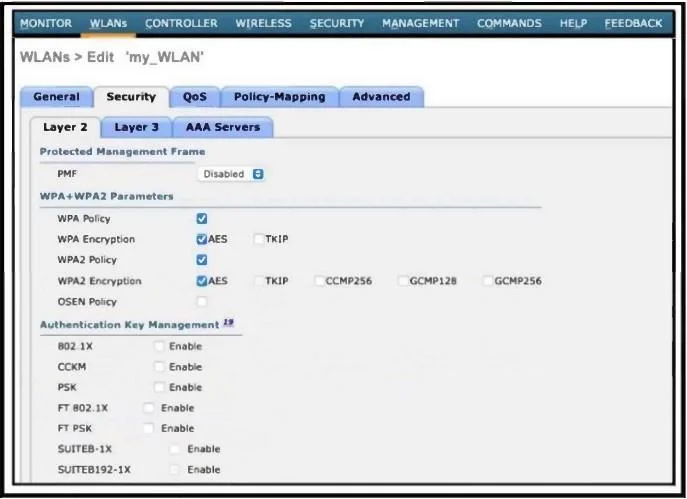
Refer to the exhibit. Which configuration is needed to configure a WLAN with WPA2 only and with a password that is 63 characters long?
The correct answer is B. Disable WPA Policy and WPA Encryption and then enable PSK using ASCII. To use WPA2 only (not WPA), disable WPA Policy and WPA Encryption. To set a 63-character password, enable PSK and use ASCII format, as WPA2-PSK supports ASCII keys up to 63
Submitted by amina.ke· Mar 5, 2026Network Access
Question
Refer to the exhibit. Which configuration is needed to configure a WLAN with WPA2 only and with a password that is 63 characters long?
Exhibits
Options
- AEnable PSK and FT PSK and then disable WPA Policy.
- BDisable WPA Policy and WPA Encryption and then enable PSK using ASCII.
- CDisable WPA Encryption and then enable FT PSK.
- DEnable PSK using Hex format and then disable WPA Policy.
How the community answered
(42 responses)- A5% (2)
- B71% (30)
- C14% (6)
- D10% (4)
Explanation
To use WPA2 only (not WPA), disable WPA Policy and WPA Encryption. To set a 63-character password, enable PSK and use ASCII format, as WPA2-PSK supports ASCII keys up to 63
Topics
#WPA2#PSK configuration#WLAN security#WLC GUI
Community Discussion
No community discussion yet for this question.