
200-301 · Question #1690
Lab Simulation 58 Please use the "Tasks" and "Topology" tabs to complete this lablet. Topology Connectivity between the devices has been established. IP services must be configured to complete the…
This lab simulation requires configuring NAT interface roles, an NTP server with a specific stratum and source, DHCP relay and exclusions, and the complete removal of SSH configuration parameters across multiple network devices.
Question
Exhibits
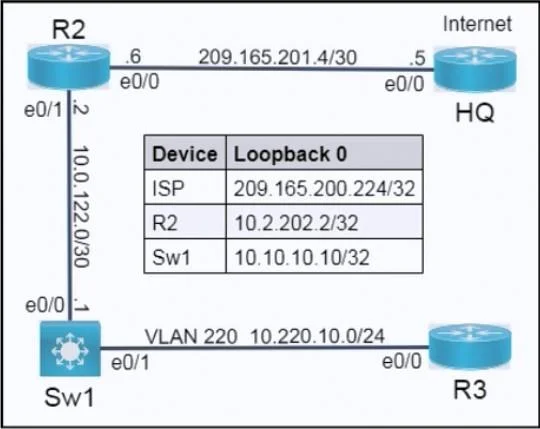
Explanation
This lab simulation requires configuring NAT interface roles, an NTP server with a specific stratum and source, DHCP relay and exclusions, and the complete removal of SSH configuration parameters across multiple network devices.
Approach. To correctly complete the simulation tasks, the following interactions and configurations are required:
Task 1: Define inside and outside interfaces for PAT on R2.
- Interaction: On Router R2, enter global configuration mode. Navigate to interface e0/1 and configure
ip nat inside. Then, navigate to interface e0/0 and configureip nat outside. - Reasoning: The task states PAT uses 10.0.122.2 (R2's e0/1 IP) as the private IP and 209.165.201.6 (R2's e0/0 IP) as the public IP. Therefore, R2's interface e0/1, which connects to the private network segment (10.0.122.0/30 and subsequently VLAN 220's 10.220.10.0/24), must be designated as the
ip nat insideinterface. R2's interface e0/0, which connects to the public Internet, must be designated as theip nat outsideinterface. This allows R2 to correctly translate private source IPs to the public IP when traffic exits to the Internet.
Task 2: Configure R2 as an NTP server.
- Interaction: On Router R2, enter global configuration mode. Configure
ntp master 3. Then, configurentp source Loopback0. - Reasoning: The command
ntp master 3configures R2 to be an authoritative NTP server, using its own internal clock as the time source and setting its stratum level to 3, as required. Thentp source Loopback0command ensures that NTP packets sourced by R2 use the stable IP address of its Loopback0 interface (10.2.202.2) rather than a physical interface, which provides resilience if a physical interface goes down. The task also specifies not to usentp broadcast clientorntp multicast clientand not to allow peering, which is consistent with R2 acting as an authoritative server (ntp master).
Task 3: Complete the DHCP configuration.
- Interaction 1 (Sw1 DHCP Relay): On Switch Sw1, enter global configuration mode. Access the interface VLAN 220 (e.g.,
interface vlan 220). Configureip helper-address 10.0.122.2. - Reasoning 1: DHCP requests are broadcast. Clients in VLAN 220 reside on the 10.220.10.0/24 network. Sw1 acts as the Layer 3 boundary for this VLAN (implied by its connection to R3 on VLAN 220 and its role as a switch). To forward DHCP requests from VLAN 220 clients to the DHCP server on R2, Sw1 must be configured with
ip helper-addresson its Switch Virtual Interface (SVI) for VLAN 220. The target IP address for the helper is R2's interface e0/1 IP (10.0.122.2), which directly connects Sw1 to R2. - Interaction 2 (R2 DHCP Exclusion): On Router R2, enter global configuration mode. Configure
ip dhcp excluded-address 10.220.10.225 10.220.10.255. - Reasoning 2: The
ip dhcp excluded-addresscommand is used to prevent the DHCP server from assigning specific IP addresses within its configured pools. This command, applied globally on R2, ensures that the range from 10.220.10.225 through 10.220.10.255 is not handed out to DHCP clients in the 10.220.10.0/24 network, fulfilling the exclusion requirement. - Interaction 3 (R3 DHCP Client): On Router R3, enter global configuration mode. Navigate to interface e0/0 (e.g.,
interface e0/0). Configureip address dhcp. Ensure the interface is active withno shutdown. - Reasoning 3: To verify R3 receives an IP address from DHCP, its interface e0/0, which is connected to VLAN 220, must be configured as a DHCP client. The
ip address dhcpcommand instructs the interface to obtain its IP address, subnet mask, and other IP parameters from a DHCP server.no shutdownensures the interface is administratively up and can participate in network communication.
Task 4: Remove SSH configuration parameters from R2.
- Interaction: On Router R2, enter global configuration mode. Configure
no ip ssh version 2. Then, configureno ip ssh. Finally, remove the RSA keys usingcrypto key zeroize rsa(and confirm with 'yes'). - Reasoning:
no ip ssh version 2directly addresses the requirement to remove SSH Version 2 support. Theno ip sshcommand disables the SSH server process entirely on R2, preventing any SSH connections from being established.crypto key zeroize rsaremoves the RSA key pair that is fundamental for SSH encryption. Without these keys, SSH cannot function, effectively and thoroughly removing SSH access and configuration from R2.
Common mistakes.
- common_mistake. Many common mistakes could lead to incorrect solutions for these tasks:
-
Task 1 (NAT): Reversing the
ip nat insideandip nat outsidecommands (e.g.,ip nat insideon e0/0 andip nat outsideon e0/1) would prevent PAT from working correctly because the router would expect private traffic on the public interface and vice versa. Another mistake is forgetting one of the commands or applying them to the wrong physical interfaces. -
Task 2 (NTP): Using
ntp server <IP_address>instead ofntp master 3would configure R2 as an NTP client syncing with another server, contradicting the requirement for R2 to use 'its clock as a time source'. Omittingntp source Loopback0means NTP packets could be sourced from a physical interface's IP, which is less stable than a loopback interface and may change if the physical interface state changes. -
Task 3 (DHCP):
- For DHCP Relay on Sw1: Configuring
ip helper-addresson a physical interface (e.g.,interface e0/1) instead of the SVI for VLAN 220 (e.g.,interface vlan 220) would fail to forward DHCP requests from clients in that VLAN. DHCP broadcasts are handled at the Layer 3 boundary, which for a VLAN on a switch is its SVI. Using an incorrect destination IP for the helper address (e.g., the Sw1 Loopback0 IP instead of R2's directly connected interface IP) would also prevent forwarding. - For DHCP Exclusion on R2: Not specifying the correct or entire range (e.g.,
10.220.10.225instead of10.220.10.225 10.220.10.255) would exclude only a single address instead of the required range. Placing theip dhcp excluded-addresscommand inside anip dhcp poolconfiguration (which is typically a global command) might not work or could cause unexpected behavior depending on the IOS version. - For R3 DHCP Client: Forgetting the
no shutdowncommand on R3's e0/0 interface would leave the interface administratively down, preventing it from sending or receiving DHCP requests and thus obtaining an IP address.
- For DHCP Relay on Sw1: Configuring
-
Task 4 (SSH): Only using
no ip ssh version 2would still leave the SSH server active (potentially for SSHv1 if enabled, or generally) and wouldn't fully remove SSH access. Only configuringno transport input sshon VTY lines would restrict SSH access to those specific lines but wouldn't disable the SSH server process itself. Not removing the crypto keys (crypto key zeroize rsa) would leave sensitive cryptographic material on the router, which is poor security practice when completely removing SSH.
Concept tested. This simulation primarily tests knowledge of:
- Network Address Translation (NAT) / Port Address Translation (PAT): Specifically, configuring
ip nat insideandip nat outsideinterfaces. - Network Time Protocol (NTP): Configuring a router as an authoritative NTP server, setting its stratum, and specifying a source interface for NTP packets.
- Dynamic Host Configuration Protocol (DHCP): Configuring DHCP relay (using
ip helper-address), excluding specific IP addresses from a DHCP pool, and configuring a device as a DHCP client. - Secure Shell (SSH): Disabling specific SSH versions, removing the SSH server, and zeroizing cryptographic keys for SSH.
Topics
Community Discussion
No community discussion yet for this question.