
200-301 · Question #1689
Lab Simulation 57 Please use the "Tasks" and "Topology" tabs to complete this lablet. Topology Tasks Connectivity between the devices has been established and IP services must be configured to…
This lab simulation requires configuring Port Address Translation (PAT) on Router R2, setting up an NTP client and a DHCP Relay Agent on Switch Sw1, and enabling SSH server with specific security parameters on Sw1.
Question
Exhibits
Explanation
This lab simulation requires configuring Port Address Translation (PAT) on Router R2, setting up an NTP client and a DHCP Relay Agent on Switch Sw1, and enabling SSH server with specific security parameters on Sw1.
Approach. The correct approach involves executing specific CLI commands on R2 and Sw1, as follows:
Task 1: Configure PAT on Router R2
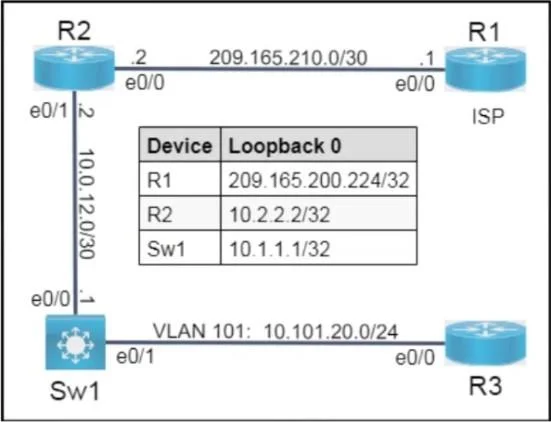
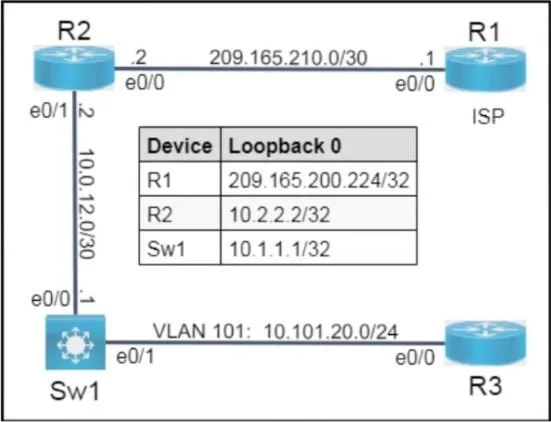
- Identify Interfaces: R2's e0/1 (10.0.12.2) is the inside interface connected to Sw1 (10.0.12.1). R2's e0/0 (209.165.210.2) is the outside interface connected to the ISP (R1).
- Define Inside Local IP: The IP 10.0.12.1 (Sw1's e0/1 interface) needs to be translated.
- Configure Access-List: If not already present, an access-list must permit the inside local IP to be translated.
R2# configure terminal
R2(config)# access-list 1 permit 10.0.12.1
4. **Mark Interfaces:** Designate the inside and outside interfaces for NAT. cli
R2(config)# interface Ethernet0/1
R2(config-if)# ip nat inside
R2(config-if)# exit
R2(config)# interface Ethernet0/0
R2(config-if)# ip nat outside
R2(config-if)# exit
5. **Apply PAT:** Configure PAT (overload) using the outside interface's IP address. cli
R2(config)# ip nat inside source list 1 interface Ethernet0/0 overload
```
6. Verification: The task specifies to ping from Sw1 to R1's loopback (209.165.200.224). On Sw1, this would be ping 209.165.200.224 source Ethernet0/1 (or source 10.0.12.1). Then, on R2, use show ip nat translations to observe the translation of 10.0.12.1 to 209.165.210.2 (R2's e0/0 IP).
Task 2: Configure an NTP client on Sw1
- Identify NTP Server: R2 (IP 10.0.12.2 on e0/1) is the NTP server.
- Configure Client: On Sw1, configure it to use R2 as its NTP server, avoiding broadcast commands as specified.
Sw1# configure terminal Sw1(config)# ntp server 10.0.12.2 ```
Task 3: Configure a DHCP Relay Agent on Sw1
- Identify Client-facing Interface: Clients are on VLAN 101 (10.101.20.0/24), so the
interface Vlan101on Sw1 is where theip helper-addresscommand should be placed. - Identify DHCP Server IP: Given that 'Router R2 has partial configurations for NAT and DHCP', it's logical to assume R2 is the DHCP server. R2's IP address on the 10.0.12.0/30 network (facing Sw1) is 10.0.12.2.
- Configure Helper Address: On Sw1, configure the
ip helper-addresson the VLAN interface that serves the DHCP clients.
Sw1# configure terminal Sw1(config)# interface Vlan101 Sw1(config-if)# ip helper-address 10.0.12.2 Sw1(config-if)# exit ```
Task 4: Configure SSH server on Sw1 VTY lines 0 to 4
- Set Hostname and Domain Name: These are prerequisites for generating RSA keys.
Sw1# configure terminal
Sw1(config)# hostname Sw1
Sw1(config)# ip domain-name example.com
2. **Generate RSA Keys:** Generate 2048-bit RSA keys. cli
Sw1(config)# crypto key generate rsa modulus 2048
3. **Set SSH Version:** Ensure SSH version 2 is used. cli
Sw1(config)# ip ssh version 2
4. **Configure VTY Lines:** Apply SSH-specific settings to the VTY lines. cli
Sw1(config)# line vty 0 4
Sw1(config-line)# transport input ssh
Sw1(config-line)# login local
Sw1(config-line)# exit
5. **Create Local User:** Create a local username and password for SSH authentication. cli
Sw1(config)# username admin privilege 15 secret cisco
```
Common mistakes.
- common_mistake. Common mistakes include:
- PAT: Forgetting the
overloadkeyword for Port Address Translation, using a static NAT configuration instead of PAT, incorrectly identifyinginsideoroutsideinterfaces, or creating an access-list that doesn't match the specified source IP. Not verifying the translation on R2 usingshow ip nat translationsis also a missed step. - NTP: Using
ntp broadcast clientorntp broadcastcommands despite the explicit constraint, or specifying an incorrect IP address for the NTP server. - DHCP Relay: Configuring the
ip helper-addresscommand on the wrong interface (e.g., a physical interface instead of the SVI for the client VLAN), or providing an incorrect IP address for the DHCP server. - SSH: Forgetting to set a hostname and domain name before generating RSA keys, using an incorrect key modulus, not explicitly setting
ip ssh version 2, or failing to configurelogin localand create a local user for authentication on the VTY lines. Usingtransport input allinstead oftransport input sshis also a common oversight if only SSH is desired.
Concept tested. The core technical concepts tested are: Cisco IOS NAT (specifically Port Address Translation - PAT) configuration, NTP client configuration, DHCP Relay Agent configuration, and Secure Shell (SSH) server configuration on Cisco IOS devices, including RSA key generation and VTY line access control.
Topics
Community Discussion
No community discussion yet for this question.