
Cisco
200-301 · Question #1679
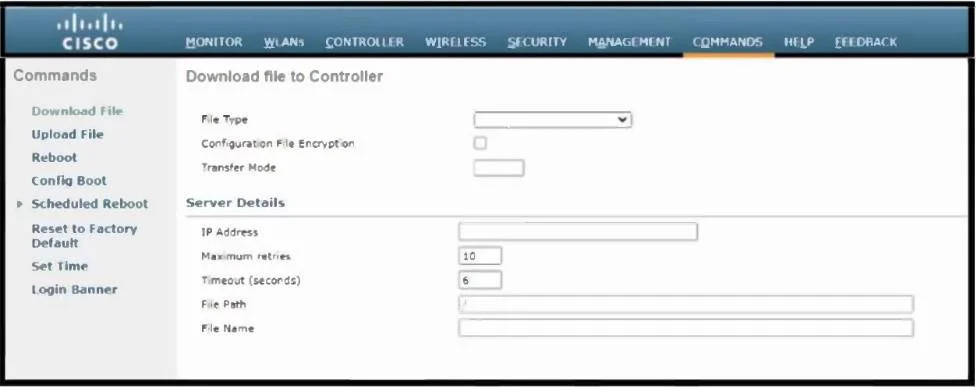
Refer to the exhibit. Which tasks must be performed on the Download File tab to install new software using TCP port 22?
The correct answer is D. Set the File Type to Code, set the Transfer Mode to SFTP and specify the IP address of the file. SFTP uses TCP port 22 for secure file transfers. To install new software (firmware), set the File Type to "Code," choose "SFTP" as the Transfer Mode, and provide the IP address of the file server hosting the software.
Submitted by rachelw· Mar 5, 2026
Question
Refer to the exhibit. Which tasks must be performed on the Download File tab to install new software using TCP port 22?
Exhibits
Options
- ASet the File Type to Configuration, set the Transfer Mode to FTP, and specify the IP address of
- BSet the File Type to Configuration, set the Transfer Mode to SFTP, and specify the IP address of
- CSet the File Type to Code, set the Transfer Mode to SFTP, and specify the IP address of the
- DSet the File Type to Code, set the Transfer Mode to SFTP and specify the IP address of the file
How the community answered
(32 responses)- A9% (3)
- B3% (1)
- C6% (2)
- D81% (26)
Explanation
SFTP uses TCP port 22 for secure file transfers. To install new software (firmware), set the File Type to "Code," choose "SFTP" as the Transfer Mode, and provide the IP address of the file server hosting the software.
Topics
#SFTP#TCP port 22#Software upgrade#File transfer protocols
Community Discussion
No community discussion yet for this question.