
200-301 · Question #1634
Lab Simulation 46 Guidelines This is a lab item in which tasks will be performed on virtual devices. - Refer to the Tasks tab to view the tasks for this lab item. - Refer to the Topology tab to…
This lab simulation requires configuring various static routes, including host, primary default, and floating static default routes with administrative distance, along with a crucial return route, and then verifying connectivity and path changes using ping and traceroute in a…
Question
Exhibits
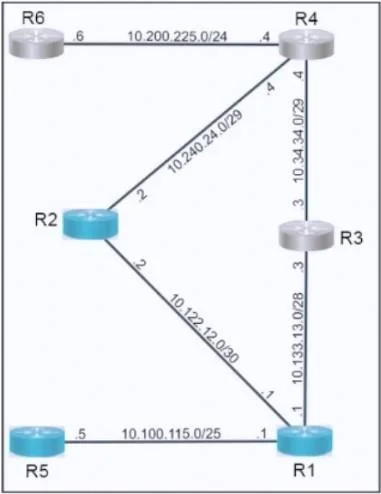
Explanation
This lab simulation requires configuring various static routes, including host, primary default, and floating static default routes with administrative distance, along with a crucial return route, and then verifying connectivity and path changes using ping and traceroute in a multi-router topology.
Approach. This lab requires precise configuration of static routes on multiple routers and verification. The steps are as follows (commands are Cisco IOS-like):
Task 1:
-
Configure a host route on R5 for the destination of 10.200.225.6:
- On R5, enter global configuration mode (
configure terminal). - Command:
ip route 10.200.225.6 255.255.255.255 10.100.115.1 - Explanation: This creates a host-specific route (/32) for R6's specific interface IP. The next-hop IP is R1's interface IP on the R5-R1 segment (10.100.115.1).
- On R5, enter global configuration mode (
-
Configure a static default route on R1 preferring the path through R3 towards R6:
- On R1, enter global configuration mode.
- Command:
ip route 0.0.0.0 0.0.0.0 10.133.13.3 - Explanation: This creates the primary default route. Any traffic originating from or passing through R1 that does not have a more specific route will be sent to R3's interface IP (10.133.13.3) on the R1-R3 segment.
-
From R5, use traceroute and ping to verify the path towards and reachability of R6:
- On R5, exit configuration mode (
end). - Commands:
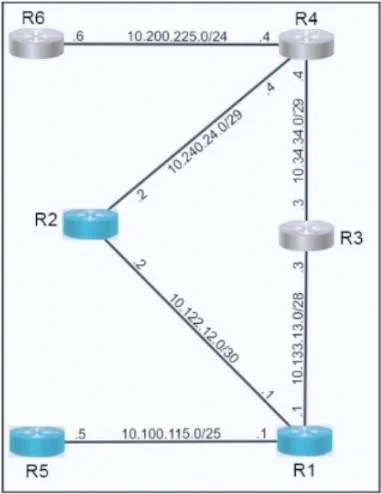
ping 10.200.225.6andtraceroute 10.200.225.6 - Expected Path: R5 (10.100.115.5) -> R1 (10.100.115.1) -> R3 (10.133.13.3) -> R4 (10.34.34.4) -> R6 (10.200.225.6). Ping should be successful, and traceroute should show hops via R1, R3, R4.
- On R5, exit configuration mode (
Task 2:
-
Configure a floating static default route on R1, preferring the path through R2 towards R6 if the link to R3 should fail. Configure the administrative distance for 200.
- On R1, enter global configuration mode.
- Command:
ip route 0.0.0.0 0.0.0.0 10.122.12.2 200 - Explanation: This creates a backup default route. With an administrative distance (AD) of 200, it is less preferred than the primary default route (which has a default AD of 1 for static routes with a next-hop IP). If the primary route through R3 becomes unavailable, this route will be installed in the routing table, forwarding traffic to R2's interface IP (10.122.12.2) on the R1-R2 segment.
-
Configure a static route on R2 to forward the return traffic towards 10.100.115.0/25:
- On R2, enter global configuration mode.
- Command:
ip route 10.100.115.0 255.255.255.128 10.122.12.1 - Explanation: This is crucial for return traffic. When R6 responds to R5, if the path goes via R2, R2 needs a route back to R5's network. This route directs traffic for the 10.100.115.0/25 network (where R5 resides) back to R1's interface IP (10.122.12.1) on the R1-R2 segment.
-
After shutting interface e0/1 on R1, use traceroute and ping from R5 to verify path towards and reachability of R6:
- On R1, enter global configuration mode.
- Commands:
interface e0/1(assuming e0/1 is the link to R3, based on question wording),shutdown - On R5, exit configuration mode (
end). - Commands:
ping 10.200.225.6andtraceroute 10.200.225.6 - Expected Path: R5 (10.100.115.5) -> R1 (10.100.115.1) -> R2 (10.122.12.2) -> R4 (10.240.24.4) -> R6 (10.200.225.6). Ping should be successful, and the traceroute should reflect the new path through R1 and R2.
Common mistakes.
- common_mistake. 1. Incorrect Next-Hop IP Addresses: A frequent mistake is specifying an incorrect next-hop IP address for a static route, which would lead to traffic being dropped or misrouted. For example, pointing a route to an interface IP on a different segment or an IP address not directly connected.
- Incorrect Subnet Mask Usage: Misunderstanding subnet masks is critical. Forgetting that a host route uses a /32 subnet mask (255.255.255.255) for a single IP, or incorrectly calculating the subnet mask for a /25 prefix (which is 255.255.255.128, not 255.255.255.0).
- Missing or Incorrect Administrative Distance (AD): Not specifying the '200' administrative distance for the floating static route on R1 would cause it to have the default AD of 1, making it equally or more preferred than the primary route (if the primary was learned via another static route type), thus preventing the failover mechanism from working as intended.
- Omission of Return Route on R2: Failing to configure the static route on R2 for the 10.100.115.0/25 network is a significant error. Without this, return traffic from R6 (if forwarded via R2 after the R1-R3 link fails) back to R5's network would not have a path from R2, resulting in one-way connectivity or complete reachability failure in the failover scenario.
- Misidentifying Interfaces: Shutting down the wrong interface on R1 (i.e., not the link connected to R3) would lead to unexpected routing behavior or fail to trigger the intended failover to the floating static route.
Concept tested. The core concepts tested in this lab simulation include configuring various types of static routes (standard, host, and default routes), implementing high availability and failover using floating static routes with custom administrative distances, understanding and configuring symmetrical return paths for successful bidirectional communication, and utilizing basic network troubleshooting tools (ping and traceroute) to verify routing paths and reachability after configuration changes or link failures. It also assesses the ability to interpret network topology diagrams and apply correct IP addressing and subnet masks.
Topics
Community Discussion
No community discussion yet for this question.