
200-301 · Question #1630
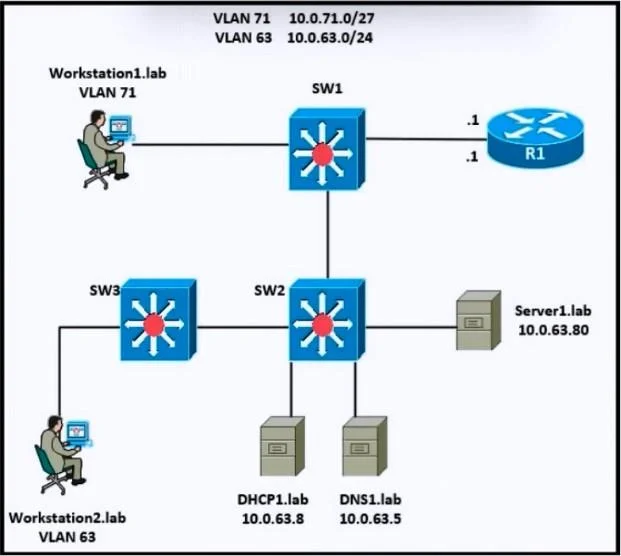
Refer to the exhibit. Which settings must be verified on workstation 1 to establish IP connectivity to server 1 using the server's fully qualified domain name?
The correct answer is D. IP address: 10.0.71.16. To establish IP connectivity from Workstation1.lab (VLAN 71) to Server1.lab (10.0.63.80) using the server's fully qualified domain name (FQDN), the workstation's IP configuration must be appropriate for VLAN 71 and able to reach the DNS server for domain name resolution. Key…
Question
Exhibits
Options
- AIP address: 10.0.63.80
- BIP address: 10.0.71.16
- CIP address: 10.0.63.80
- DIP address: 10.0.71.16
How the community answered
(22 responses)- A18% (4)
- B14% (3)
- C5% (1)
- D64% (14)
Explanation
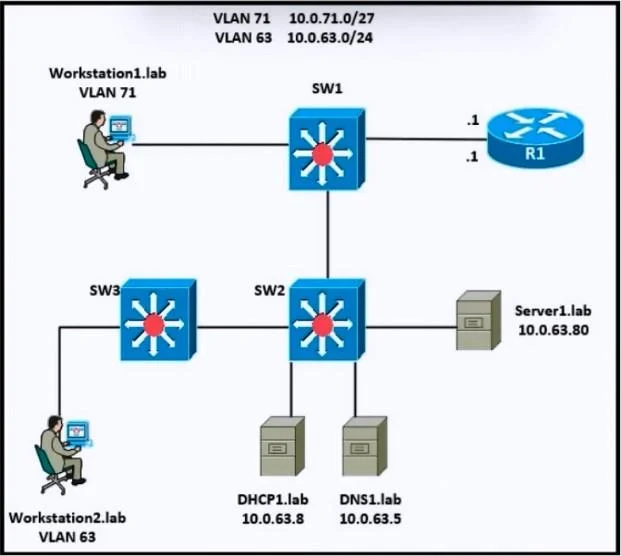
To establish IP connectivity from Workstation1.lab (VLAN 71) to Server1.lab (10.0.63.80) using the server's fully qualified domain name (FQDN), the workstation's IP configuration must be appropriate for VLAN 71 and able to reach the DNS server for domain name resolution. Key points from the diagram: VLAN 71: Workstation1.lab is on VLAN 71 with the subnet 10.0.71.0/27 (which has a range of 10.0.71.1 to 10.0.71.30). VLAN 63: Server1.lab is in VLAN 63 with the subnet 10.0.63.0/24. The DNS server is also in VLAN 63 with the IP address 10.0.63.5. IP address: The IP address of Workstation1 must be in the 10.0.71.0/27 subnet to communicate properly in VLAN 71. Subnet mask: For VLAN 71, the subnet mask is 255.255.255.224 (/27). Default gateway: The default gateway for Workstation1 should be 10.0.71.1, which is in VLAN 71 and connects to Router R1. DNS server: The DNS server should be 10.0.63.5 (from VLAN 63) to resolve the FQDN of
Topics
Community Discussion
No community discussion yet for this question.