
200-301 · Question #1604
Lab Simulation 42 Guidelines This is a lab item in which tasks will be performed on virtual devices. - Refer to the Tasks tab to view the tasks for this lab item. - Refer to the Topology tab to…
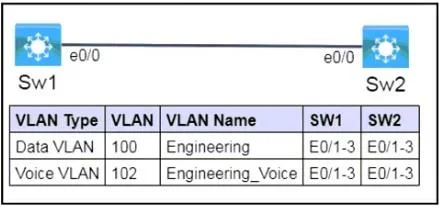
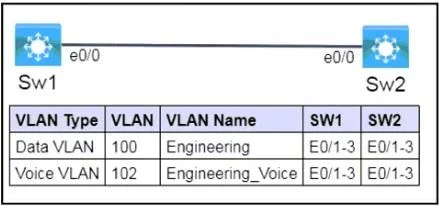
This lab simulation requires configuring VLANs, assigning them to access ports for data and voice, and managing neighbor discovery protocols (CDP and LLDP) on specified switch interfaces across two switches.
Question
Exhibits
Explanation
This lab simulation requires configuring VLANs, assigning them to access ports for data and voice, and managing neighbor discovery protocols (CDP and LLDP) on specified switch interfaces across two switches.
Approach. The correct interaction involves entering specific Cisco IOS commands into the console of both Sw1 and Sw2 to fulfill the three tasks.
On both Sw1 and Sw2:
1. Configure VLANs:
enable
configure terminal
vlan 100
 name Engineering
exit
vlan 102
 name Engineering_Voice
exit
2. Configure Access Ports (E0/1, E0/2, E0/3) for Data and Voice: This ensures that connected PCs receive traffic from VLAN 100 and IP phones can tag voice traffic with VLAN 102.
interface range E0/1 - 3
 switchport mode access
 switchport access vlan 100
 switchport voice vlan 102
exit
3. Configure Neighbor Discovery (LLDP and CDP) on E0/0: First, enable LLDP globally. Then, configure E0/0 to transmit and receive LLDP and disable CDP.
lldp run
interface E0/0
 lldp transmit
 lldp receive
 no cdp enable
exit
4. Save Configuration:
end
copy running-config startup-config
These commands correctly create and name the specified VLANs, configure the end-device facing ports with both data and voice VLANs, and manage the neighbor discovery protocols on the inter-switch link as required.
Common mistakes.
- common_mistake. Common mistakes include:
- Forgetting to create VLANs or misnaming them: The ports cannot be assigned to VLANs that don't exist or are incorrectly named.
- Configuring access ports as trunk ports (
switchport mode trunk): This is incorrect for end-device (PC/IP phone) connections. Access ports are designed for untagged traffic (data VLAN) and tagged traffic for voice VLANs. - Omitting
switchport voice vlan: Without this command, IP phones will not correctly receive their voice VLAN assignment, potentially leading to voice traffic issues. - Not enabling LLDP globally (
lldp run): LLDP won't function on interfaces if it's not enabled globally first. - Incorrectly applying CDP/LLDP commands: Forgetting to disable CDP on E0/0 or not enabling LLDP on the same interface. Enabling LLDP globally but not on the specific interface, or vice-versa, can also be a mistake.
- Typographical errors: Simple typos in VLAN IDs, names, or interface ranges will lead to configuration failures.
- Forgetting to save the configuration (
copy running-config startup-config): All changes will be lost upon reboot or power cycle, failing the 'save configurations to NVRAM' guideline.
Concept tested. This question tests the candidate's ability to configure VLANs, assign both data and voice VLANs to access ports, and manage Layer 2 neighbor discovery protocols (Cisco Discovery Protocol - CDP, and Link Layer Discovery Protocol - LLDP) on Cisco Catalyst switches.
Topics
Community Discussion
No community discussion yet for this question.