
200-301 · Question #1600
Lab Simulation 41 Guidelines This is a lab item in which tasks will be performed on virtual devices. - Refer to the Tasks tab to view the tasks for this lab item. - Refer to the Topology tab to…
This lab simulation tests the ability to configure 802.1Q trunking and IEEE 802.3ad LACP EtherChannel on Cisco-like switches to enable inter-VLAN communication across the trunk link.
Question
Exhibits
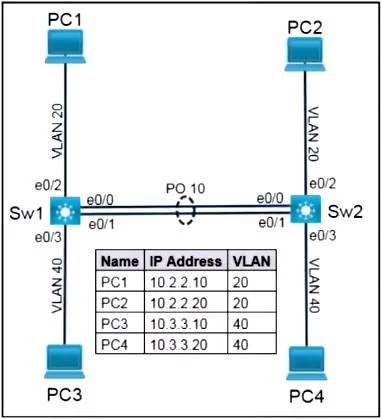
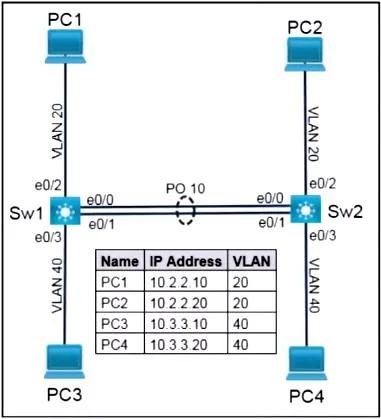
Explanation
This lab simulation tests the ability to configure 802.1Q trunking and IEEE 802.3ad LACP EtherChannel on Cisco-like switches to enable inter-VLAN communication across the trunk link.
Approach. The core of this lab requires configuring EtherChannel (link aggregation) and 802.1Q trunking (VLAN tagging) simultaneously on the logical Port-channel interface between Sw1 and Sw2. The tasks are performed on both Sw1 and Sw2 using a Cisco IOS-like command-line interface.
General steps for both Sw1 and Sw2 (assuming Cisco IOS syntax):
- Access the console for Sw1 and Sw2.
- Enter privileged EXEC mode (
enable). - Enter global configuration mode (
configure terminal).
Task 2: Configure IEEE 802.3ad Link Aggregation (LACP) for Port-channel 10
This involves bundling interfaces e0/0 and e0/1 into a single logical link, Port-channel 10, using LACP. Sw1 will be active and Sw2 will be passive as per the requirement for Sw2 not to negotiate but respond.
On Sw1:
interface range ethernet 0/0 - 0/1
  channel-group 10 mode active  // Assigns interfaces e0/0 and e0/1 to Port-channel 10, actively initiating LACP negotiation
  no shutdown                   // Ensures the physical interfaces are up
  exit
On Sw2:
interface range ethernet 0/0 - 0/1
  channel-group 10 mode passive // Assigns interfaces e0/0 and e0/1 to Port-channel 10, passively waiting for LACP negotiation
  no shutdown                   // Ensures the physical interfaces are up
  exit
Task 1: Configure Trunks (IEEE 802.1Q) on the Port-channel
Note: Trunking configurations must be applied to the logical Port-channel interface (Port-channel 10), not the individual physical interfaces, once the EtherChannel is formed. The 'IT_User_VLAN' is designated as the untagged VLAN; without a specified ID, it is typically assumed to be VLAN 1, the default native VLAN on Cisco devices. We will configure VLAN 1 as the native VLAN and ensure it's allowed along with VLANs 20 and 40 on the trunk.
On Sw1 (after configuring channel-group):
interface Port-channel 10
  switchport mode trunk                   // Enable 802.1Q trunking on the logical interface
  switchport trunk encapsulation dot1q    // Explicitly set 802.1Q encapsulation (good practice, though often default for trunk mode)
  switchport trunk native vlan 1          // Set VLAN 1 (IT_User_VLAN) as the untagged/native VLAN
  switchport trunk allowed vlan 1,20,40   // Allow only native VLAN 1 and VLANs 20, 40 on the trunk
  no shutdown
  exit
On Sw2 (after configuring channel-group):
interface Port-channel 10
  switchport mode trunk
  switchport trunk encapsulation dot1q
  switchport trunk native vlan 1
  switchport trunk allowed vlan 1,20,40
  no shutdown
  exit
Final Steps for both Sw1 and Sw2:
end
write memory // Save the configuration to NVRAM as per guidelines, crucial for retaining changes
Verification (as per Task 1):
- From PC1, ping PC2 (10.2.2.20). This tests connectivity for VLAN 20.
- From PC3, ping PC4 (10.3.3.20). This tests connectivity for VLAN 40. Both pings should be successful, indicating that the EtherChannel is formed, trunking is operational, and the allowed VLANs are correctly propagating.
Additional verification commands:
show etherchannel summary(to verify LACP status and port-channel formation)show interfaces trunk(to verify trunking mode, native VLAN, and allowed VLANs)
Common mistakes.
- common_mistake. 1. Applying trunk configuration to physical interfaces: A frequent mistake is attempting to configure
switchport mode trunkorswitchport trunk allowed vlandirectly on the physical interfaces (e.g., e0/0, e0/1). Once interfaces are bundled into an EtherChannel, their Layer 2 configurations are inherited from the logical Port-channel interface. Configuring them individually often leads to errors or incorrect behavior.
- Incorrect LACP modes: Setting both Sw1 and Sw2 to
mode activeor both tomode passiveforchannel-groupcommands will prevent the LACP bundle from forming. The task explicitly states Sw2 'does not negotiate but responds to negotiation requests,' which necessitatesmode passiveon Sw2 andmode activeon Sw1 for successful negotiation. - Missing or incorrect native VLAN: Failing to explicitly configure the
native vlan(assuming VLAN 1 for IT_User_VLAN) on the trunk, or mismatching the native VLAN ID between Sw1 and Sw2, will cause communication issues for untagged frames, including control plane traffic. - Incorrect allowed VLANs: Not including the native VLAN (VLAN 1) in the
switchport trunk allowed vlancommand, or allowing all VLANs (switchport trunk allowed vlan all) instead of explicitly pruning the allowed VLANs to 1, 20, and 40, violates the task requirement. - Forgetting to save configuration: In lab simulations, failing to issue
write memoryorcopy running-config startup-configwill result in the loss of all applied configurations upon the device reboot or lab reset, leading to task failure and potential loss of points.
Concept tested. IEEE 802.1Q VLAN Trunking, Cisco EtherChannel configuration, IEEE 802.3ad Link Aggregation Control Protocol (LACP) and its modes (active/passive), Native VLAN configuration, VLAN pruning on trunks, and basic switch interface configuration (accessing console, privileged and global configuration modes, interface range commands, saving configuration to NVRAM).
Topics
Community Discussion
No community discussion yet for this question.