
200-301 · Question #1575
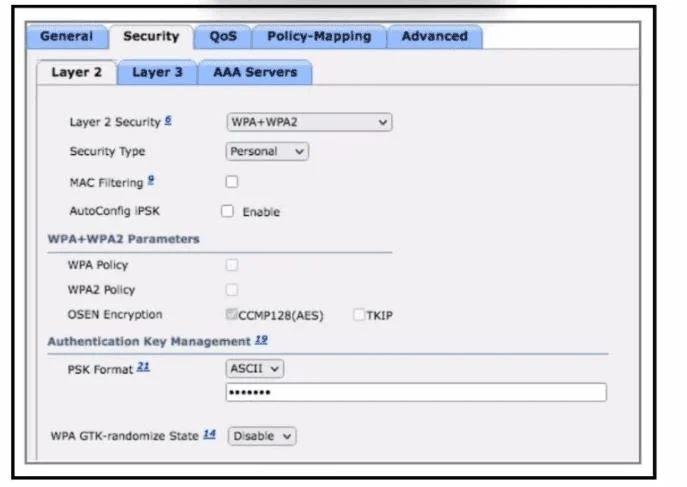
Refer to the exhibit. Company A wants to use a RADIUS server to service all user and device authentication attempts with a more secure and granular authentication approach. Not all client devices…
The correct answer is B. Select Authentication server under the AAA servers tab. C. Configure Enterprise Security type under the Layer 2 tab. To implement RADIUS-based authentication for all users and devices, including those without dot1x support, the Wireless LAN Controller (WLC) must be configured with an Enterprise Security type and point to the RADIUS server.
Question
Refer to the exhibit. Company A wants to use a RADIUS server to service all user and device authentication attempts with a more secure and granular authentication approach. Not all client devices support dot1x authentication. Which two configuration changes must be made to accomplish the task? (Choose two.)
Exhibits
Options
- AEnable AutoConfig IPSK under the Layer 2 tab.
- BSelect Authentication server under the AAA servers tab.
- CConfigure Enterprise Security type under the Layer 2 tab.
- DSet Authentication under the Layer 3 tab.
- EEnable WPA2 Policy under the Layer 2 tab.
How the community answered
(24 responses)- A8% (2)
- B75% (18)
- D13% (3)
- E4% (1)
Why each option
To implement RADIUS-based authentication for all users and devices, including those without dot1x support, the Wireless LAN Controller (WLC) must be configured with an Enterprise Security type and point to the RADIUS server.
AutoConfig IPSK is a feature for managing pre-shared keys for devices without 802.1X, but it is not the primary configuration for a comprehensive RADIUS-based enterprise authentication solution for all users and devices.
To use a RADIUS server for authentication, it must be explicitly configured and selected under the AAA servers tab, linking the wireless network to the external authentication service for centralized user and device validation.
Configuring 'Enterprise Security type' (e.g., WPA2/WPA3 Enterprise) under the Layer 2 tab is necessary to enable 802.1X authentication, which leverages a RADIUS server for centralized, secure, and granular user and device authentication, while also allowing for other RADIUS-backed methods like MAC Authentication Bypass for non-dot1x clients.
Setting authentication under the Layer 3 tab typically refers to post-association web authentication or guest access, not the fundamental Layer 2 authentication for connecting to the wireless network using a RADIUS server.
Enabling a generic WPA2 policy is insufficient as it does not specify the WPA2-Enterprise mode necessary for integration with a RADIUS server for centralized authentication.
Concept tested: WLC RADIUS/AAA and Enterprise WLAN configuration
Source: https://www.cisco.com/c/en/us/td/docs/wireless/controller/8-5/config-guide/b_cg85/b_cg85_chapter_01011.html#d2463e2652a1639
Topics
Community Discussion
No community discussion yet for this question.