
200-301 · Question #1569
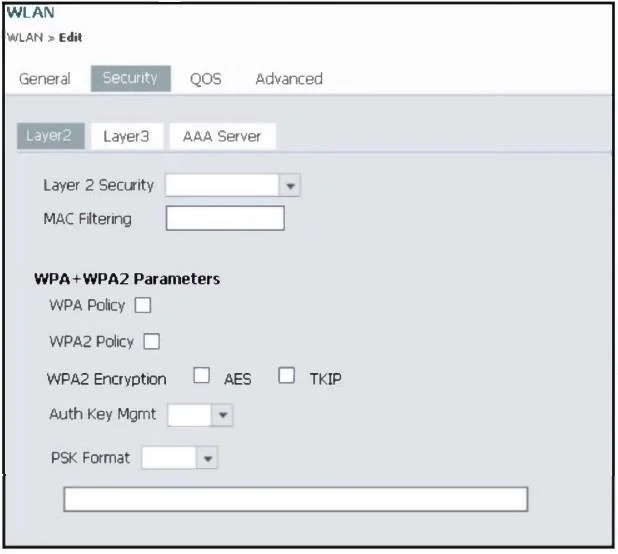
Refer to the exhibit. An engineer is using the Cisco WLC GUI to configure a WLAN for WPA2 encryption with AES and preshared key Cisc0123456. After the engineer selects the WPA + WPA2 option from the…
The correct answer is C. Select PSK from the Auth Key Mgmt drop-down list, set the PSK Format to ASCII, and enter the D. Select the WPA2 Policy and AES check boxes. To configure WPA2 encryption with AES and a preshared key, the engineer must select the WPA2 Policy and AES checkboxes, and configure PSK from the Auth Key Mgmt dropdown with the correct format and key.
Question
Exhibits
Options
- ASelect the WPA2 Policy, AES, and TKIP check boxes.
- BSelect ASCII from the PSK Format drop-down list, enter the key, and leave the Auth Key Mgmt
- CSelect PSK from the Auth Key Mgmt drop-down list, set the PSK Format to ASCII, and enter the
- DSelect the WPA2 Policy and AES check boxes.
- ESelect CCKM from the Auth Key Mgmt drop-down list, set the PSK Format to Hex, and enter the
How the community answered
(40 responses)- A3% (1)
- B10% (4)
- C83% (33)
- E5% (2)
Why each option
To configure WPA2 encryption with AES and a preshared key, the engineer must select the WPA2 Policy and AES checkboxes, and configure PSK from the Auth Key Mgmt dropdown with the correct format and key.
Selecting TKIP is incorrect because the requirement explicitly specifies AES encryption, and TKIP is an older, less secure encryption method not recommended for WPA2.
This option is incomplete; it correctly mentions setting the PSK format and entering the key but omits the critical step of explicitly selecting 'PSK' for Auth Key Management.
To utilize a preshared key, 'PSK' must be chosen from the Auth Key Mgmt drop-down list, and then the PSK Format (ASCII for 'Cisc0123456') and the actual key must be entered.
To enforce WPA2 encryption with AES, the 'WPA2 Policy' checkbox must be selected from the available options, and subsequently, the 'AES' checkbox within that policy must also be enabled.
CCKM (Cisco Centralized Key Management) is a fast roaming mechanism, not an Auth Key Management method for PSK, and the PSK format for 'Cisc0123456' should be ASCII, not Hex.
Concept tested: Cisco WLC WPA2-PSK with AES configuration
Source: https://www.cisco.com/c/en/us/td/docs/wireless/controller/8-5/config-guide/b_cg85/wlan_security_wpa_wpa2.html
Topics
Community Discussion
No community discussion yet for this question.