
200-301 · Question #1526
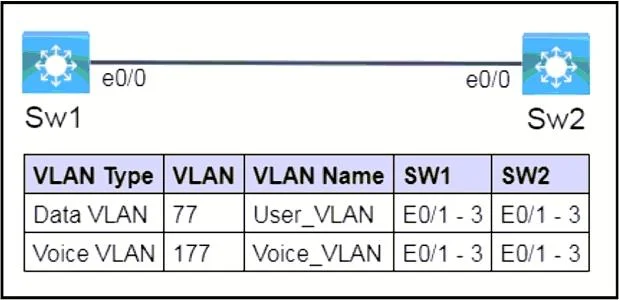
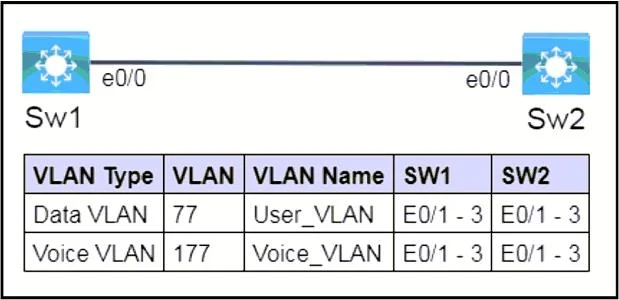
Lab Simulation 25 Guidelines This is a lab item in which tasks will be performed on virtual devices. - Refer to the Tasks tab to view the tasks for this lab item. - Refer to the Topology lab to…
Lab Simulation 25: Voice/Data VLAN Configuration with LLDP --- Overall Goal The lab sets up two switches (Sw1, Sw2) to simultaneously support data traffic from PCs and voice traffic from Cisco IP phones on the same physical ports, then enables vendor-neutral neighbor discovery…
Question
Exhibits
Explanation
Lab Simulation 25: Voice/Data VLAN Configuration with LLDP
Overall Goal
The lab sets up two switches (Sw1, Sw2) to simultaneously support data traffic from PCs and voice traffic from Cisco IP phones on the same physical ports, then enables vendor-neutral neighbor discovery on a specific port.
This is a classic voice/data convergence scenario. Rather than running separate physical cabling for phones and computers, Cisco switches use two VLANs on a single port: one for data, one for voice. The phone daisy-chains the PC through its built-in switch, and the switch separates traffic by VLAN.
Step 1 - Create and Name VLANs
vlan 77 / name User_VLAN
vlan 177 / name Voice_VLAN
Why necessary: VLANs must exist in the VLAN database before you can assign ports to them. If you skip this and jump straight to port configuration, the switch will either reject the VLAN assignment or create an unnamed VLAN - depending on the IOS version. Naming them (User_VLAN, Voice_VLAN) is required here because the exam grades the exact names from the topology.
What it accomplishes: Creates two isolated broadcast domains. VLAN 77 carries PC/data traffic; VLAN 177 carries IP phone traffic (typically tagged with CoS/QoS markings).
If skipped: Ports assigned to non-existent VLANs go into an inactive state. Traffic is dropped.
Step 2 - Configure Access + Voice VLAN on Ports E0/1-E0/3
switchport mode access
switchport access vlan 77
switchport voice vlan 177
Why switchport mode access: Explicitly sets the port as an access port (not a trunk). This is required before assigning a single untagged data VLAN. Without it, the port defaults to dynamic auto and may attempt to negotiate a trunk, which breaks the voice VLAN setup.
Why switchport access vlan 77: Assigns untagged frames (from the PC plugged into the phone's passthrough port) to VLAN 77.
Why switchport voice vlan 177: This is the key command for Cisco IP phones. It instructs the switch to:
- Send CDP to the phone advertising VLAN 177 as the voice VLAN
- Accept 802.1Q-tagged frames from the phone on VLAN 177
- Apply QoS trust on those tagged frames
The port is technically still an "access" port from a data perspective, but it carries a second VLAN specifically for the phone using inline tagging.
Why interface range E0/1-3: Applies the configuration to all three ports simultaneously - more efficient and less error-prone than configuring each individually.
If skipped or out of order: If you set the voice VLAN before switchport mode access, the command may be rejected or silently ignored on some IOS versions. If you omit switchport voice vlan 177, phones will not receive their VLAN assignment via CDP and will either fail to register or send voice traffic over the data VLAN, degrading call quality.
Step 3 - Enable LLDP on e0/0
lldp run
Why this command: The task specifies a vendor-neutral neighbor discovery protocol. This is the key phrase - it means LLDP (Link Layer Discovery Protocol), not CDP. CDP is Cisco-proprietary; LLDP is the IEEE 802.1AB standard that works across multi-vendor environments.
lldp run enables LLDP globally on the switch. By default, Cisco switches run CDP but not LLDP.
Why only e0/0: The task scopes LLDP to e0/0. You could also use interface e0/0 + lldp transmit / lldp receive to limit it to that port, but enabling it globally (lldp run) satisfies the requirement since e0/0 will then participate. The exam answer uses the global command, which is simpler and correct.
If skipped: Neighbor discovery on e0/0 would only function via CDP, which non-Cisco devices cannot use. Any vendor-neutral device on that port (e.g., a non-Cisco switch or router) would not appear in show lldp neighbors.
Memory Tips
| Concept | Mnemonic |
|---|---|
| Voice VLAN command | "voice goes on the phone, access goes on the PC" |
| LLDP vs CDP | "LLDP = Link (neutral/standard), CDP = Cisco (proprietary)" |
| Order matters | Create VLAN -> Assign to port - you can't assign what doesn't exist |
lldp run = global | One command enables it everywhere; then per-interface tuning is optional |
Key exam trap: If a question says "vendor-neutral discovery protocol," the answer is always LLDP, never CDP. If it says "Cisco proprietary," it's CDP. The two are not interchangeable.
Topics
Community Discussion
No community discussion yet for this question.