
200-301 · Question #1519
Lab Simulation 23 Guidelines This is a lab item in which tasks will be performed on virtual devices. - Refer to the Tasks tab to view the tasks for this lab item. - Refer to the Topology lab to…
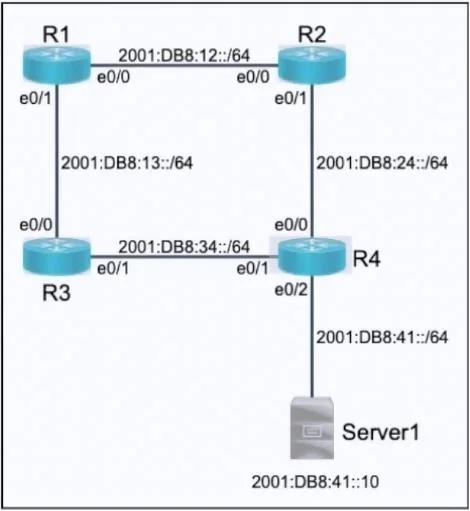
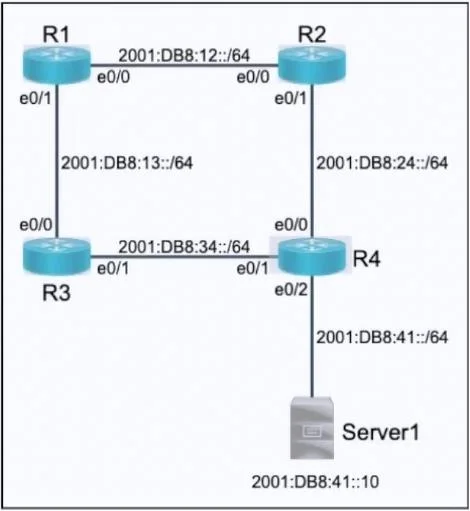
Lab Simulation 23 - IPv6 Static Routing with Floating Route --- Overall Goal The lab establishes end-to-end IPv6 connectivity to the 2001:db8:41::/64 network (hosted behind R4) using static routing across a 4-router topology. The topology looks like this: `` R1 ──── R2 ──── R4…
Question
Exhibits
Explanation
Lab Simulation 23 - IPv6 Static Routing with Floating Route
Overall Goal
The lab establishes end-to-end IPv6 connectivity to the 2001:db8:41::/64 network (hosted behind R4) using static routing across a 4-router topology. The topology looks like this:
R1 ──── R2 ──── R4 ──── [2001:db8:41::/64]
 \             /
  R3 ─────────
Two requirements drive the design:
- Primary path: R1 -> R2 -> R4 (preferred)
- Backup path: R1 -> R3 -> R4 (used only if R1-R2 link fails)
This is achieved using a floating static route - a backup route with a higher administrative distance (AD) that sits dormant until the primary route disappears from the routing table.
Step-by-Step Explanation
Steps 1-5: Configure R1
R1(config)# ipv6 route 2001:db8:41::/64 2001:db8:12::2
R1(config)# ipv6 route 2001:db8:41::/64 2001:db8:13::3 2
Step 2 - Primary route via R2:
2001:db8:12::2 is R2's address on the R1-R2 link. This installs a static route with the default AD of 1. R1 will use R2 as the next hop whenever the link is up.
Step 3 - Floating (backup) route via R3:
The trailing 2 sets the AD to 2, which is higher than the primary route's AD of 1. IOS only installs the lowest AD route into the active routing table, so this route stays hidden while the R1-R2 link is up. If that link goes down, the primary route is removed, and this backup route becomes active automatically.
What goes wrong if you skip the
2? Both routes have AD 1, so IOS installs both and load-balances traffic - the "prefer R2" requirement fails.
What goes wrong if you skip the backup route entirely? If the R1-R2 link fails, R1 has no path to
2001:db8:41::/64and traffic is dropped.
Step 4-5: end exits config mode; wr saves to NVRAM (required by lab instructions).
Steps 6-10: Configure R2
R2(config)# ipv6 route 2001:db8:41::/64 2001:db8:24::4
R2 needs to know how to forward packets it receives from R1 onward to R4. 2001:db8:24::4 is R4's address on the R2-R4 link.
What goes wrong if skipped? Packets from R1 reach R2 but R2 has no route to
2001:db8:41::/64and drops them. Ping fails even though R1's routing is correct.
Steps 11-15: Configure R3
R3(config)# ipv6 route 2001:db8:41::/64 2001:db8:34::4
Same logic as R2, but for the backup path. R3 forwards to R4 via 2001:db8:34::4 (R4's address on the R3-R4 link).
What goes wrong if skipped? The floating route on R1 activates correctly when R1-R2 fails, but traffic dies at R3 because R3 doesn't know where to send it.
Steps 16-21: Configure R4
R4(config)# ipv6 route 2001:db8:12::/64 2001:db8:24::2
R4(config)# ipv6 route 2001:db8:13::/64 2001:db8:34::3
This is the most commonly missed part of the lab. R4 can reach 2001:db8:41::/64 (it's directly connected), but it has no return path to R1's subnets. Without these routes, ping fails because:
- ICMP echo requests reach R4 successfully
- R4 cannot route the ICMP echo replies back to R1
2001:db8:12::/64 is the R1-R2 link subnet; R4 reaches it via R2 (2001:db8:24::2).
2001:db8:13::/64 is the R1-R3 link subnet; R4 reaches it via R3 (2001:db8:34::3).
What goes wrong if skipped? One-way reachability only.
pingappears to fail from R1's perspective (no replies), andtracerouteshows the path going forward but never returning.
Why Order Matters
The configurations on each router are independent of each other, so the router order doesn't technically matter. However, within each router's config block, end must come before wr - you can't save from config mode.
Memory Tip
Think of it as three rules:
- Every router that forwards traffic needs a route - don't forget the intermediate routers (R2, R3) and especially R4's return routes.
- Floating = higher AD - the backup route's AD must be numerically greater than the primary's. Default static AD is 1, so use 2 or higher for the backup.
- Ping needs a round trip - always ask "does the destination know how to get back?" R4's return routes are the classic trap.
Topics
Community Discussion
No community discussion yet for this question.