
200-301 · Question #1447
Lab Simulation 18 Guidelines This is a lab item in which tasks will be performed on virtual devices. - Refer to the Tasks tab to view the tasks for this lab item. - Refer to the Topology tab to…
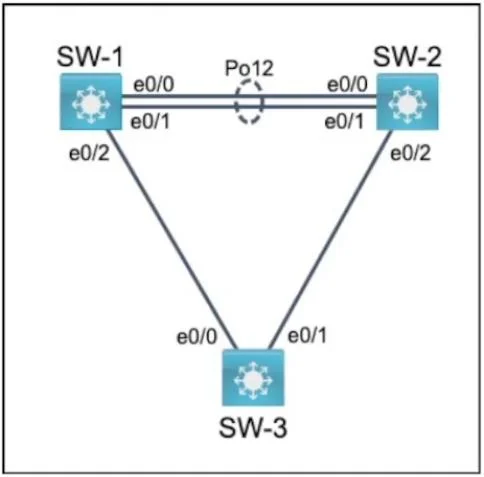
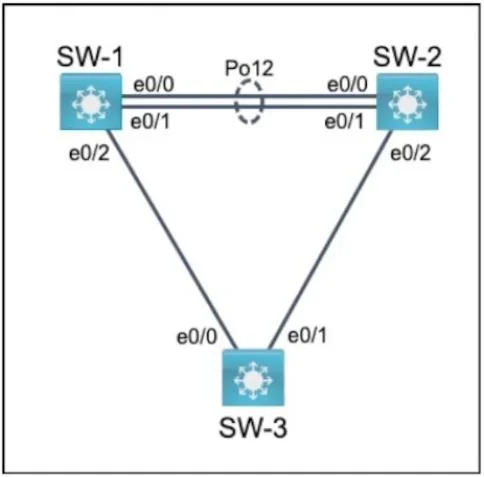
The lab simulation requires configuring VLAN trunking with a specific native VLAN and LACP-based EtherChannel between three Cisco switches according to detailed specifications.
Question
Exhibits
Explanation
The lab simulation requires configuring VLAN trunking with a specific native VLAN and LACP-based EtherChannel between three Cisco switches according to detailed specifications.
Approach. The correct approach involves accessing the console of each switch (SW-1, SW-2, and SW-3) and applying the specified Cisco IOS commands to fulfill each task. The order of operations is important, especially when configuring EtherChannel, as the trunking parameters are typically applied to the Port-Channel interface.
SW-1 Configuration:
enable
configure terminal
interface range e0/0, e0/1
 channel-group 12 mode active
 exit
interface port-channel 12
 switchport trunk encapsulation dot1q
 switchport mode trunk
 switchport trunk native vlan 35
 exit
interface e0/2
 switchport trunk encapsulation dot1q
 switchport mode trunk
 switchport trunk native vlan 35
 exit
end
write memory
SW-2 Configuration:
enable
configure terminal
interface range e0/0, e0/1
 channel-group 12 mode passive
 exit
interface port-channel 12
 switchport trunk encapsulation dot1q
 switchport mode trunk
 switchport trunk native vlan 35
 exit
interface e0/2
 switchport trunk encapsulation dot1q
 switchport mode trunk
 switchport trunk native vlan 35
 exit
end
write memory
SW-3 Configuration:
enable
configure terminal
interface range e0/0, e0/1
 switchport trunk encapsulation dot1q
 switchport mode trunk
 switchport trunk native vlan 35
 exit
end
write memory
Reasoning for each task:
- Trunking on SW-1/SW-2 e0/0 and e0/1 (Port-Channel 12): These interfaces form an EtherChannel, so trunking properties (
switchport trunk encapsulation dot1qandswitchport mode trunk) are applied to the logicalinterface port-channel 12. This allows all VLANs to pass over the trunk as per the default behavior unlessswitchport trunk allowed vlanis used to filter. - Native VLAN 35 on all inter-switch links: The command
switchport trunk native vlan 35must be applied tointerface port-channel 12(on both SW-1 and SW-2) and to the direct inter-switch links (e0/2on SW-1,e0/2on SW-2, ande0/0,e0/1on SW-3). All these links must also be explicitly configured as 802.1q trunks (switchport trunk encapsulation dot1qandswitchport mode trunk) for the native VLAN command to take effect. - LACP Link Aggregation on SW-1/SW-2 e0/0 and e0/1: On SW-1, the physical interfaces
e0/0ande0/1are configured withchannel-group 12 mode activeto initiate LACP negotiation. On SW-2, the same physical interfaces are configured withchannel-group 12 mode passiveto respond to LACP requests, fulfilling the requirement for immediate negotiation from SW-1 and passive response from SW-2.
Common mistakes.
- common_mistake. Common mistakes include:
- Incorrect LACP modes: Setting both ends to 'passive' would prevent the EtherChannel from forming, as neither side would initiate LACP. Setting both to 'active' would work but does not meet the specific requirement that SW-2 only responds. Using 'on' mode (unconditional EtherChannel) would disable LACP and prevent dynamic negotiation.
- Forgetting to configure trunking/native VLAN on Port-Channel: Trunking parameters (
switchport mode trunk,switchport trunk encapsulation dot1q,switchport trunk native vlan) must be applied to theinterface port-channel 12after the physical interfaces have been assigned to it. Applying them only to the physical interfaces before the channel group command might lead to unexpected behavior or loss of configuration. - Missing trunk configuration on direct links: Interfaces e0/2 on SW-1, e0/2 on SW-2, and e0/0/e0/1 on SW-3 are also inter-switch links and must be configured as 802.1Q trunks with native VLAN 35. Forgetting this would result in incorrect VLAN routing between switches and SW-3.
- Incorrect encapsulation: On Cisco switches, it's crucial to specify
switchport trunk encapsulation dot1qbeforeswitchport mode trunkwhen dealing with older switches that might support ISL, or just for best practice and clarity, even if 802.1Q is the only option. - Not saving the configuration: Failing to execute
write memoryorcopy running-config startup-configwould result in the loss of all configurations upon reboot or lab termination.
Concept tested. The core concepts tested are Cisco IOS switch configuration for:
- VLAN Trunking (IEEE 802.1Q): Establishing inter-switch links capable of carrying traffic for multiple VLANs.
- Native VLAN: Understanding and configuring the untagged VLAN on 802.1Q trunks.
- Link Aggregation (EtherChannel/Port Aggregation Protocol): Grouping multiple physical links into a single logical link for increased bandwidth and redundancy.
- Link Aggregation Control Protocol (LACP): Dynamically negotiating EtherChannel links using active and passive modes.
- Interface Configuration: Applying settings to physical and logical (Port-Channel) interfaces, including using interface ranges.
Topics
Community Discussion
No community discussion yet for this question.