
200-301 · Question #1440
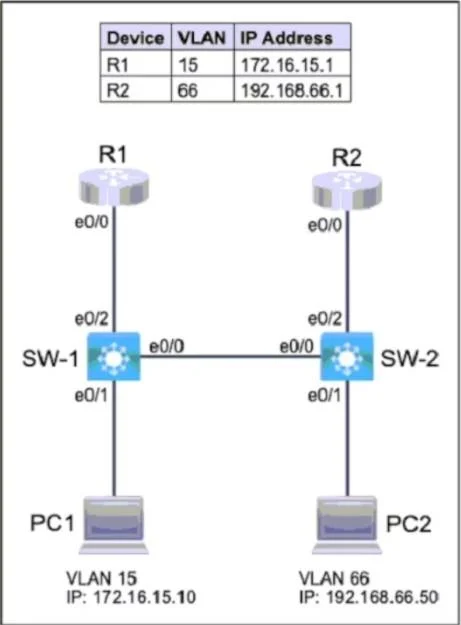
Lab Simulation 16 Guidelines This is a lab item in which tasks will be performed on virtual devices. - Refer to the Tasks tab to view the tasks for this lab item. - Refer to the Topology tab to…
Lab Simulation 16 - Full Explanation Overall Goal This lab configures two Cisco switches to segment traffic using VLANs and control which neighbor discovery protocol operates on each interface. The core ideas: VLANs isolate broadcast domains, access ports restrict PCs to…
Question
Exhibits
Explanation
Lab Simulation 16 - Full Explanation
Overall Goal
This lab configures two Cisco switches to segment traffic using VLANs and control which neighbor discovery protocol operates on each interface. The core ideas: VLANs isolate broadcast domains, access ports restrict PCs to exactly one VLAN, and neighbor discovery protocols let network devices learn about adjacent devices - but you may want different protocols on different links.
Task 1 & 2: Create VLANs
SW-1(config)#vlan 15
SW-1(config-vlan)#name OPS
SW-1(config-vlan)#exit

SW-2(config)#vlan 66
SW-2(config-vlan)#name ENGINEERING
SW-2(config-vlan)#exit
Why: A VLAN must exist in the switch's VLAN database before any port can be assigned to it. The vlan 15 command creates the VLAN and enters VLAN config mode. name OPS labels it - the label must be exact (case-sensitive). exit is critical: it commits the VLAN to the database. Without exit, the VLAN may not be saved.
If skipped: Assigning a port to a nonexistent VLAN puts it in an inactive state - the port shows up but traffic won't pass. The switch will warn you, but it won't stop you, making this a silent failure.
Task 3 & 4: Configure Access Ports for PC1 and PC2
SW-1(config)#int e0/1
SW-1(config-if)#switchport mode access
SW-1(config-if)#switchport access vlan 15
SW-1(config-if)#no shut

SW-2(config)#int e0/1
SW-2(config-if)#switchport mode access
SW-2(config-if)#switchport access vlan 66
SW-2(config-if)#no shut
switchport mode access - Forces the port into access mode (single VLAN, no trunking negotiation). The lab requires "each port must only allow one VLAN." Without this, the port might try to negotiate a trunk with the PC, which PCs don't understand. It also prevents Dynamic Trunking Protocol (DTP) from accidentally forming a trunk.
switchport access vlan 15/66 - Assigns the port to the correct VLAN. Without this, the port defaults to VLAN 1.
no shut - Brings the interface up. Cisco switch ports are usually up by default on physical hardware, but in simulated environments they can be administratively down. The task says ports must be "operational," so this is required.
If done out of order: Setting the VLAN before switchport mode access still works, but it's safer to set the mode first - some IOS versions behave inconsistently otherwise.
Task 5: Neighbor Discovery Protocol Configuration
Step A - Enable LLDP globally
SW-1(config)#lldp run
SW-2(config)#lldp run
Why: LLDP (Link Layer Discovery Protocol, IEEE 802.1AB) is disabled by default on Cisco devices - CDP is on by default. lldp run enables LLDP globally. Without this, no interface can use LLDP regardless of interface-level commands.
LLDP vs CDP:
- CDP (Cisco Discovery Protocol) - Cisco proprietary, on by default, works only between Cisco devices
- LLDP - Vendor-neutral IEEE standard, works across multi-vendor environments
Step B - Disable LLDP on E0/0, keep CDP active
SW-1(config)#int e0/0
SW-1(config-if)#no lldp transmit
SW-1(config-if)#no lldp receive
SW-1(config-if)#cdp enable
Why: Now that LLDP is globally enabled, E0/0 would run both LLDP and CDP. The lab requires E0/0 to use only CDP. You must suppress LLDP on that specific interface with no lldp transmit and no lldp receive - both directions must be disabled. cdp enable is technically redundant (CDP is on by default) but explicitly confirms compliance.
If you only disable one direction: The interface still participates in LLDP partially - it either sends or receives LLDP frames, which violates the requirement.
E0/2 is left alone after lldp run - it inherits LLDP globally and retains CDP. If the task required only LLDP on E0/2, you'd also need no cdp enable there. Read the task carefully - here it only specifies LLDP for E0/2 neighbor discovery, not exclusive LLDP.
What Happens If Steps Are Skipped or Reordered
| Skipped Step | Consequence |
|---|---|
exit after VLAN config | VLAN may not be committed; port assignment fails silently |
switchport mode access | Port may trunk; PC gets no connectivity |
switchport access vlan X | PC lands on VLAN 1, wrong segment |
no shut | Port stays down; PC has no link |
lldp run | LLDP never works on any interface |
no lldp transmit/receive | E0/0 runs both protocols, violating the requirement |
Memory Tips
- VLAN creation order: Create -> Name -> Exit (CNE). You must exit to commit.
- Access port order: Mode -> VLAN -> No Shut (MVN). Mode first, so the switch knows what kind of port it is before you assign a VLAN.
- LLDP/CDP rule: "Global on, then surgically remove where unwanted." Enable LLDP everywhere, then strip it from interfaces that must stay CDP-only.
- CDP vs LLDP: "C for Cisco, L for Liberal (open standard)."
Topics
Community Discussion
No community discussion yet for this question.