
200-301 · Question #1377
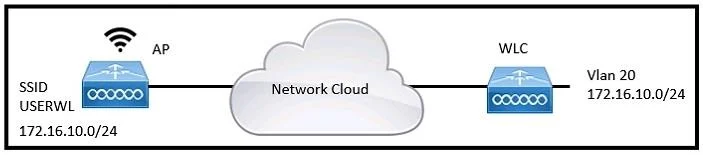
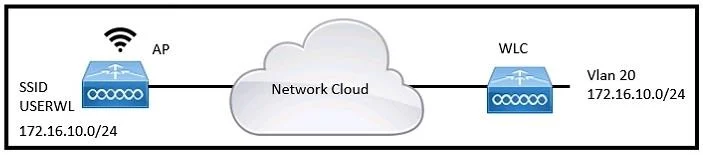
Refer to the exhibit. A network engineer is configuring a WLAN to connect with the 172.16.10.0/24 network on VLAN 20. The engineer wants to limit the number of devices that connect to the WLAN on…
The correct answer is B. In the WLAN configuration, set the Maximum Allowed Clients value to 125. To limit the number of devices connecting to a specific WLAN, the 'Maximum Allowed Clients' setting must be configured in the WLAN's profile on the WLC.
Question
Exhibits
Options
- AIn the Controller IPv6 configuration, set the Throttle value to 125.
- BIn the WLAN configuration, set the Maximum Allowed Clients value to 125.
- CIn the Management Software activation configuration, set the Clients value to 125.
- DIn the Advanced configuration, set the DTIM value to 125.
How the community answered
(43 responses)- A2% (1)
- B84% (36)
- C5% (2)
- D9% (4)
Why each option
To limit the number of devices connecting to a specific WLAN, the 'Maximum Allowed Clients' setting must be configured in the WLAN's profile on the WLC.
The Controller IPv6 configuration and its 'Throttle' value are unrelated to limiting the number of clients on a specific WLAN; throttling usually pertains to bandwidth management.
Wireless LAN Controllers (WLCs) allow administrators to specify the maximum number of clients that can associate with a particular WLAN (SSID) by configuring the 'Maximum Allowed Clients' value directly within that WLAN's settings.
Management Software activation configuration typically deals with licensing or enabling software features, not with setting client limits for a WLAN.
DTIM (Delivery Traffic Indication Message) is a wireless parameter related to power saving and beacon intervals, not the maximum number of connected clients.
Concept tested: WLC WLAN client limit configuration
Source: https://www.cisco.com/c/en/us/td/docs/wireless/controller/8-5/config-guide/b_cg85/m_wlan_config.html
Topics
Community Discussion
No community discussion yet for this question.