
200-301 · Question #1301
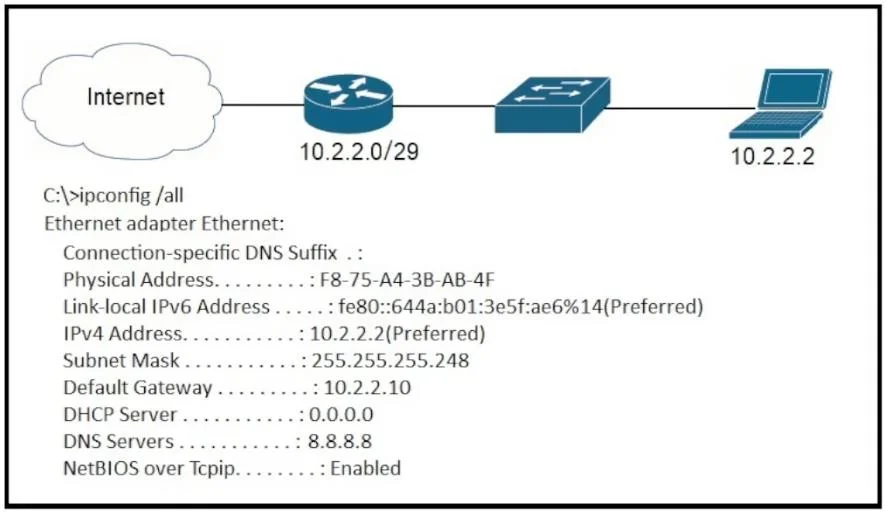
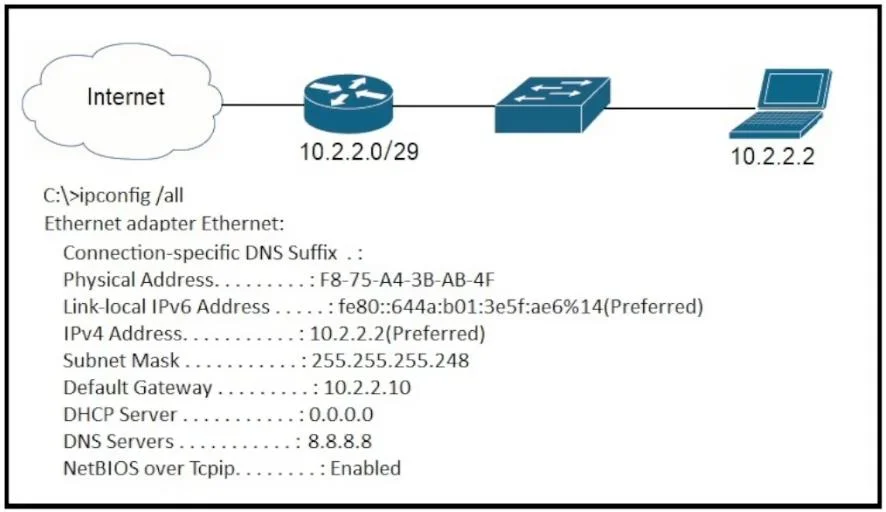
Refer to the exhibit. A newly configured PC fails to connect to the internet by using TCP port 80 to
The correct answer is C. Default Gateway. If a newly configured PC cannot connect to the internet, it is highly probable that its default gateway is either incorrectly configured or missing. The default gateway is essential for directing traffic from the local network to external networks, including the internet.
Question
Exhibits
Options
- ASubnet Mask
- BDNS Servers
- CDefault Gateway
- DDHCP Servers
How the community answered
(37 responses)- A8% (3)
- B5% (2)
- C70% (26)
- D16% (6)
Why each option
If a newly configured PC cannot connect to the internet, it is highly probable that its default gateway is either incorrectly configured or missing. The default gateway is essential for directing traffic from the local network to external networks, including the internet.
An incorrect subnet mask can prevent local network communication or misinterpret network boundaries, but it is less likely the sole reason for complete internet access failure if the default gateway is within the perceived local subnet.
While incorrect or missing DNS servers would prevent name resolution (e.g., browsing by hostname), the PC could still connect to internet sites using their IP addresses, and DNS issues don't fundamentally block TCP port 80 connectivity at a routing level.
The default gateway IP address is crucial for a host to communicate with devices outside its local subnet, including the internet. If a PC fails to connect to the internet, it indicates that it cannot route traffic beyond its local network, which is the primary function of a correctly configured default gateway. Without a proper default gateway, the PC's packets destined for the internet have no path to leave the local network.
DHCP servers dynamically assign IP configurations. If the PC has a valid IP address configured (either statically or via a prior DHCP lease), the DHCP server itself is not the direct reason for failing internet connectivity.
Concept tested: TCP/IP addressing and internet connectivity troubleshooting
Source: https://learn.microsoft.com/en-us/troubleshoot/windows-server/networking/tcp-ip-addressing-and-routing-basics
Topics
Community Discussion
No community discussion yet for this question.