nerdexam
CiscoCisco

200-301 · Question #1141

200-301 Question #1141: Real Exam Question with Answer & Explanation

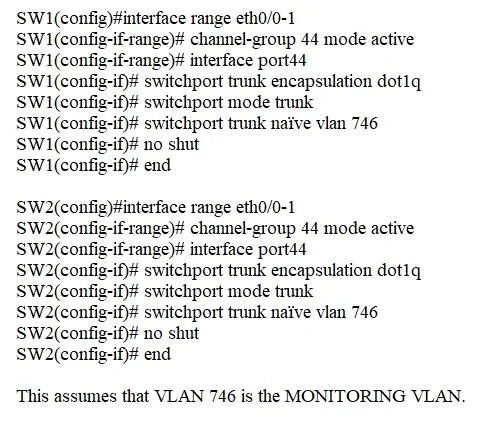
This simulation requires configuring LACP (802.3ad) EtherChannel using 'channel-group 44 mode active' on both switches for interfaces Ethernet0/0 and Ethernet0/1, which enables dynamic LACP negotiation. The Port-channel 44 interface must then be configured as an 802.1Q trunk with

Submitted by parkjh· Mar 5, 2026This question tests the 'Configure and verify Layer 2 discovery protocols' and 'Configure and verify EtherChannel (LACP)' objectives found in Cisco CCNP ENCOR (350-401) under the Layer 2 domain, specifically covering port aggregation, LACP negotiation modes, trunk encapsulation, and native VLAN assignment on Port-channel interfaces.

Question

Lab Simulation 9 Guidelines This is a lab item in which tasks will be performed on virtual devices - Refer to the Tasks tab to view the tasks for this lab item. - Refer to the Topology tab to access the device console(s) and perform the tasks - Console access is available for all required devices by clicking the device icon or using the tab(s) above the console window - All necessary preconfigurations have been applied - Do not change the enable password or hostname for any device - Save your configurations to NVRAM before moving to the next item - Click Next at the bottom of the screen to submit this lab and move to the next question - When Next is clicked the lab closes and cannot be reopened Topology Tasks Physical connectivity is implemented between the two Layer 2 switches, and the network connectivity between them must be configured. 1. Configure an LACP EtherChannel and number it as 44; configure it between switches SW1 and SW2 using interfaces Ethemet0/0 and Ethernet0/1 on both sides. The LACP mode must match on both ends. 2. Configure the EtherChannel as a trunk link. 3. Configure the trunk link with 802.1q tags. 4. Configure VLAN 'MONITORING' as the untagged VLAN of the EtherChannel. Answer:

Options

  • taskConfigure LACP EtherChannel 44 between switches SW1 and SW2 using interfaces Ethernet0/0 and Ethernet0/1 on both sides, ensuring matching LACP mode. Configure this EtherChannel as an 802.1q tagged trunk link, with VLAN 'MONITORING' (VLAN 746) as the untagged VLAN.
  • prerequisitesConsole access to SW1 and SW2

Explanation

This simulation requires configuring LACP (802.3ad) EtherChannel using 'channel-group 44 mode active' on both switches for interfaces Ethernet0/0 and Ethernet0/1, which enables dynamic LACP negotiation. The Port-channel 44 interface must then be configured as an 802.1Q trunk with 'switchport trunk encapsulation dot1q', 'switchport mode trunk', and 'switchport trunk native vlan 746' to set VLAN 746 (MONITORING) as the untagged (native) VLAN. Both sides must match in LACP mode (active/active or active/passive) and trunk parameters for the EtherChannel to successfully form and pass traffic.

Topics

#EtherChannel#LACP#802.1Q Trunking#Layer 2 Switching

Community Discussion

No community discussion yet for this question.

Full 200-301 PracticeBrowse All 200-301 Questions