
200-301 · Question #1031
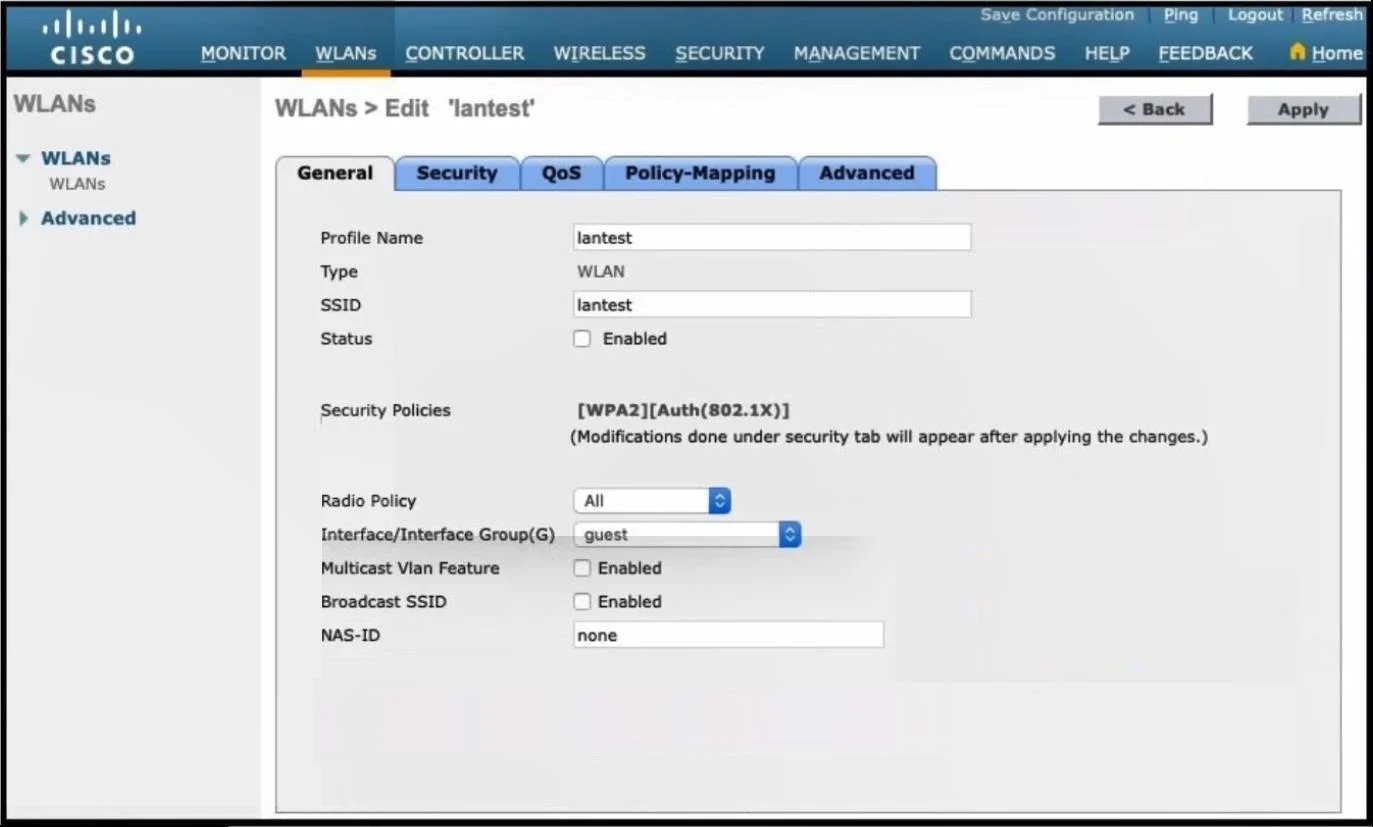
Refer to the exhibit. A Cisco engineer creates a new WLAN called lantest. Which two actions must be performed so that only high-speed 2.4-Ghz clients connect? (Choose two.)
The correct answer is B. Enable the Status option. C. Set the Radio Policy option to 802 11g Only. To configure a WLAN to exclusively support high-speed 2.4 GHz clients, the WLAN must be enabled and its radio policy set to 802.11g Only.
Question
Refer to the exhibit. A Cisco engineer creates a new WLAN called lantest. Which two actions must be performed so that only high-speed 2.4-Ghz clients connect? (Choose two.)
Exhibits
Options
- AEnable the Broadcast SSID option.
- BEnable the Status option.
- CSet the Radio Policy option to 802 11g Only.
- DSet the Radio Policy option to 802.11a Only.
- ESet the Interface/Interface Group(G) to an interface other than guest.
How the community answered
(28 responses)- A11% (3)
- B82% (23)
- D4% (1)
- E4% (1)
Why each option
To configure a WLAN to exclusively support high-speed 2.4 GHz clients, the WLAN must be enabled and its radio policy set to 802.11g Only.
Enabling 'Broadcast SSID' makes the WLAN visible to clients but does not impose restrictions on client connectivity based on radio frequency or speed.
For any WLAN to become operational and allow client connections, its 'Status' (or equivalent activation setting) must be explicitly enabled within the wireless controller configuration.
Setting the 'Radio Policy' to '802.11g Only' restricts the WLAN to operate solely on the 2.4 GHz frequency band using the 802.11g standard. This ensures that only compatible high-speed (up to 54 Mbps) 2.4 GHz clients can connect, excluding 5 GHz clients or slower 802.11b devices.
Setting the 'Radio Policy' to '802.11a Only' would restrict clients to the 5 GHz band, which contradicts the requirement for '2.4-Ghz clients'.
Setting the Interface/Interface Group pertains to network access, VLAN assignment, and segmentation, not to restricting client connectivity by radio type or frequency band.
Concept tested: WLAN radio policy and activation
Source: https://www.cisco.com/c/en/us/td/docs/wireless/controller/8-5/config-guide/b_cg85/b_cg85_chapter_01000.html
Topics
Community Discussion
No community discussion yet for this question.