
1Z0-909 · Question #4
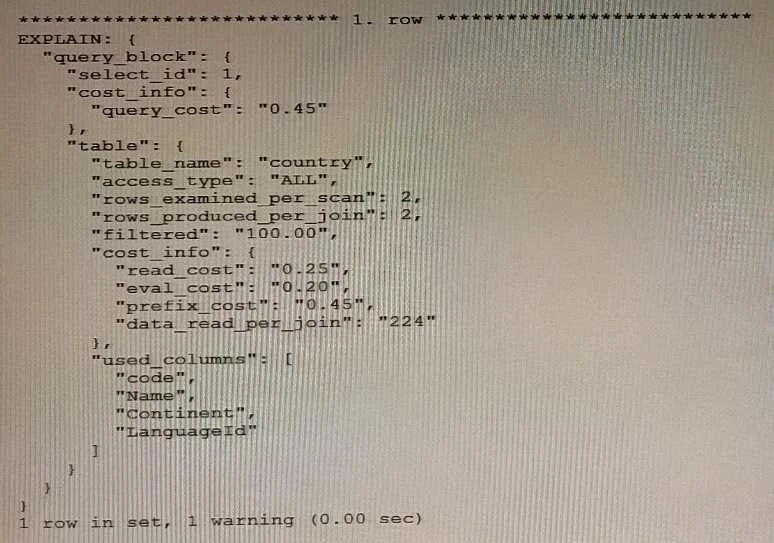
Examine the output: Which explain command will obtain the output?
The correct answer is E. EXPLAIN PORMAT=JSON. EXPLAIN FORMAT=JSON (option E) produces a structured JSON output with nested fields like "query_block", "cost_info", and "table" - the format the question's output displays. JSON output provides the richest detail, including cost estimates and access type metadata not visible…
Question
Examine the output:
Which explain command will obtain the output?
Exhibit
Options
- AEXPLAIN ANALYZE
- BEXPLAIN PARTITIONS
- CEXPLAIN FORMAT=TREE
- DEXPLAIN PORMAT^TRADITIONAL
- EEXPLAIN PORMAT=JSON
How the community answered
(25 responses)- B8% (2)
- D4% (1)
- E88% (22)
Explanation
EXPLAIN FORMAT=JSON (option E) produces a structured JSON output with nested fields like "query_block", "cost_info", and "table" - the format the question's output displays. JSON output provides the richest detail, including cost estimates and access type metadata not visible in other formats.
Why the distractors are wrong:
- A (EXPLAIN ANALYZE) executes the query and adds actual runtime metrics (loops, timing), producing a different output style - not pure JSON structure.
- B (EXPLAIN PARTITIONS) reveals which table partitions the optimizer will access, outputting a tabular result, not JSON.
- C (EXPLAIN FORMAT=TREE) outputs a human-readable hierarchical tree (indented text), not JSON key-value pairs.
- D (EXPLAIN PORMAT^TRADITIONAL) is invalid on two counts:
PORMATis a misspelling ofFORMAT, and^is not a valid assignment operator - the correct syntax uses=.
Note that option E also contains the PORMAT typo in the question wording, but the intended syntax is EXPLAIN FORMAT=JSON, which is valid.
Memory tip: Think "J for JavaScript-style output" - FORMAT=JSON gives you the curly-brace, key-value structure you'd recognize from any JSON document, making it the only choice that matches a JSON-shaped EXPLAIN output.
Topics
Community Discussion
No community discussion yet for this question.