
1Z0-902 · Question #33
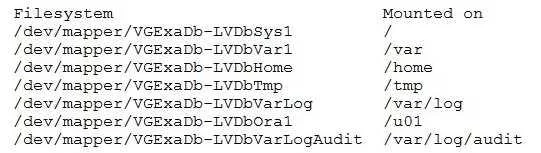
You are adding a disk expansion kit to a running Exadata X8M Database Machine's Database Servers, and have a filesystem layout that includes: After running the following commands, which command…
The correct answer is A. # lvextend -L +20G --verbose /dev/mapper/VGExaDb-LVDbOral. After running the commands above, the filesystem mounted on /u01 is on the logical volume /dev/mapper/VGExaDb-LVDbOral. So, to add 20G of space to the filesystem mounted on /u01, the command that needs to be run is: lvextend -L +20G --verbose /dev/mapper/VGExaDb-LVDbOral This…
Question
You are adding a disk expansion kit to a running Exadata X8M Database Machine's Database Servers, and have a filesystem layout that includes:
After running the following commands, which command needs to be run to add 20G of space to the filesystem mounted on /u01?
Exhibit
Options
- A
lvextend -L +20G --verbose /dev/mapper/VGExaDb-LVDbOral
- B
xfs_growfs /uOl +20G
- C
resize2fs +20G /dev/VGExaDb/LVDbOral
- D
lvextend -L +20G --verbose /dev/VGExaDb/LVDbOral
How the community answered
(34 responses)- A76% (26)
- B6% (2)
- C15% (5)
- D3% (1)
Explanation
After running the commands above, the filesystem mounted on /u01 is on the logical volume /dev/mapper/VGExaDb-LVDbOral. So, to add 20G of space to the filesystem mounted on /u01, the command that needs to be run is: lvextend -L +20G --verbose /dev/mapper/VGExaDb-LVDbOral This command will extend the logical volume /dev/mapper/VGExaDb-LVDbOral by 20 GB of space. It is important to note that the option --verbose is used to display the progress of the operation.
Topics
Community Discussion
No community discussion yet for this question.