
Oracle
1Z0-821 · Question #98
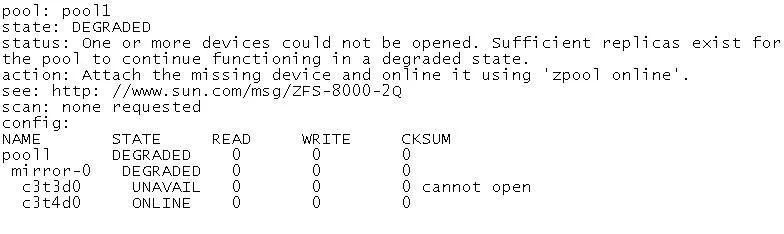
Review the storage pool information: Choose the correct procedure to repair this storage pool.
Sign in or unlock 1Z0-821 to reveal the answer and full explanation for question #98. The question stem and answer options stay visible for context.
Managing Data Storage
Question
Review the storage pool information:
Choose the correct procedure to repair this storage pool.
Exhibit
Options
- AShut the system down, replace disk c3t3d0, and boot the system. When the system is booted,
- BShut the system down, replace disk c3t3d0, and boot the system. When the system is booted
- CShut the system down, replace disk c3t3d0, and boot the system. When the system is booted,
- DShut the system down, replace disk c3t3d0, and boot the system. When the system is booted,
Unlock 1Z0-821 to see the answer
You've previewed enough free 1Z0-821 questions. Unlock 1Z0-821 for full answers, explanations, the timed quiz mode, progress tracking, and the master PDF. Question stem and options stay visible so you can still see what's on the exam.
Topics
#ZFS pool repair#zpool replace#degraded pool#disk replacement