
Oracle
1Z0-821 · Question #96
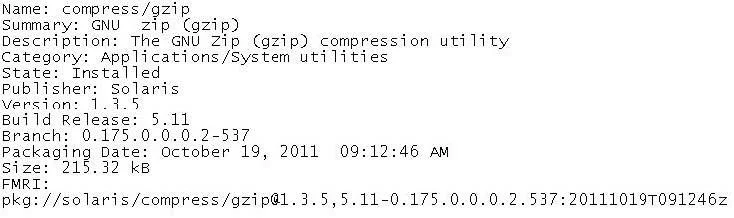
View the following information for a software package: Which command would you use to display this information for a software package that is not currently installed on your system?
Sign in or unlock 1Z0-821 to reveal the answer and full explanation for question #96. The question stem and answer options stay visible for context.
Managing Software Packages
Question
View the following information for a software package:
Which command would you use to display this information for a software package that is not currently installed on your system?
Exhibit
Options
- Apkg list gzip
- Bpkg info -r gzip
- Cpkg search -1 gzip
- Dpkg verify -v gzip
- Epkg contents gzip
Unlock 1Z0-821 to see the answer
You've previewed enough free 1Z0-821 questions. Unlock 1Z0-821 for full answers, explanations, the timed quiz mode, progress tracking, and the master PDF. Question stem and options stay visible so you can still see what's on the exam.
Topics
#IPS#pkg info -r#remote package info#uninstalled packages