
Oracle
1Z0-821 · Question #52
Review the non-global zone configuration displayed below: The global zone has 1024 MB of physical memory. You need to limit the non-global zone so that it uses no more than 500 MB of the global…
Sign in or unlock 1Z0-821 to reveal the answer and full explanation for question #52. The question stem and answer options stay visible for context.
Administering Oracle Solaris 11 OS on a Single System
Question
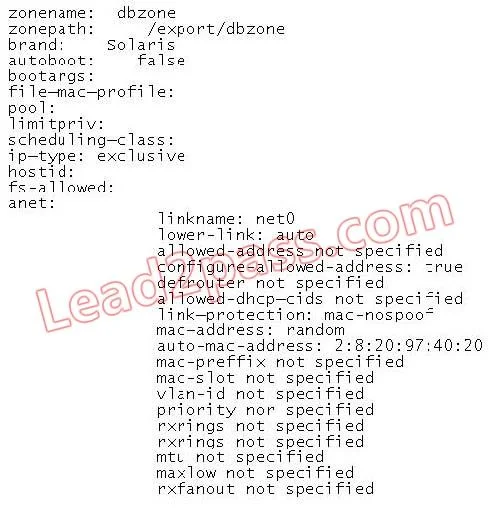
Review the non-global zone configuration displayed below:
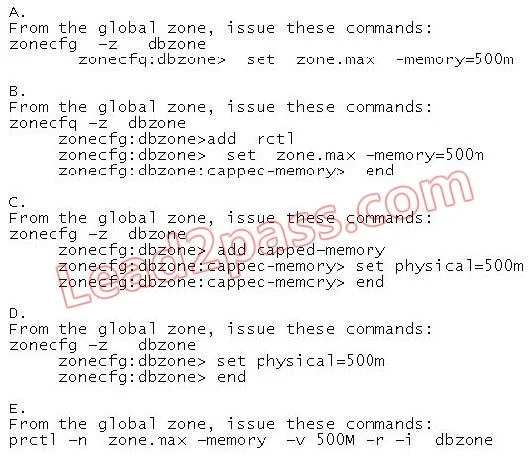
The global zone has 1024 MB of physical memory. You need to limit the non-global zone so that it uses no more than 500 MB of the global zone's physical memory. Which option would you choose?
Exhibits
Options
- AOption A
- BOption B
- COption C
- DOption D
- EOption E
Unlock 1Z0-821 to see the answer
You've previewed enough free 1Z0-821 questions. Unlock 1Z0-821 for full answers, explanations, the timed quiz mode, progress tracking, and the master PDF. Question stem and options stay visible so you can still see what's on the exam.
Topics
#non-global zones#memory limits#zone configuration#resource management