
Oracle
1Z0-820 · Question #44
The crash dump notification on your server is: Documentation states that there should be two core files for each crash dump in the /var/crash directory named vmdump.0 Which command should you choose…
Sign in or unlock 1Z0-820 to reveal the answer and full explanation for question #44. The question stem and answer options stay visible for context.
Analyzing and Troubleshooting System Problems
Question
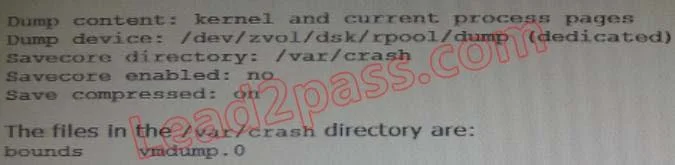
The crash dump notification on your server is:
Documentation states that there should be two core files for each crash dump in the /var/crash directory named vmdump.0 Which command should you choose to display theses two files?
Exhibit
Options
- Asavecore -f vmdump.0
- Bdumpadm uncompressed
- Cgunzip vmdump.0
- Ddumpadm -z off
Unlock 1Z0-820 to see the answer
You've previewed enough free 1Z0-820 questions. Unlock 1Z0-820 for full answers, explanations, the timed quiz mode, progress tracking, and the master PDF. Question stem and options stay visible so you can still see what's on the exam.
Topics
#crash dump handling#savecore command#core files#system troubleshooting