
Oracle
1Z0-591 · Question #63
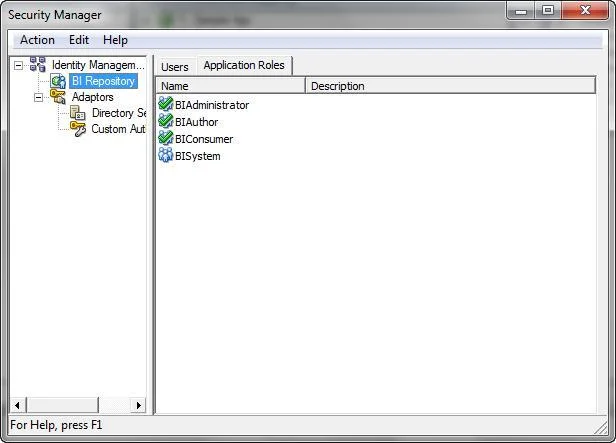
Query limits tab can be accessed through________.
Sign in or unlock 1Z0-591 to reveal the answer and full explanation for question #63. The question stem and answer options stay visible for context.
Setting Up Query Limits and Usage Tracking
Question
Query limits tab can be accessed through________.
Exhibit
Options
- ASecurity Manager, Query tab, Application role dialog box, Permissions
- BSecurity Manager, Application Roles tab, Query dialog box, Permissions
- CSecurity Manager, Application Roles tab, Application role dialog box, Permissions
- DSecurity Manager, Application Roles tab, Application role dialog box, Query Properties
Unlock 1Z0-591 to see the answer
You've previewed enough free 1Z0-591 questions. Unlock 1Z0-591 for full answers, explanations, the timed quiz mode, progress tracking, and the master PDF. Question stem and options stay visible so you can still see what's on the exam.
Topics
#query limits#Security Manager#application roles#query properties