nerdexam
Oracle

1Z0-591 · Question #62

Which option is used to enter the rank function when creating a new rank measure?

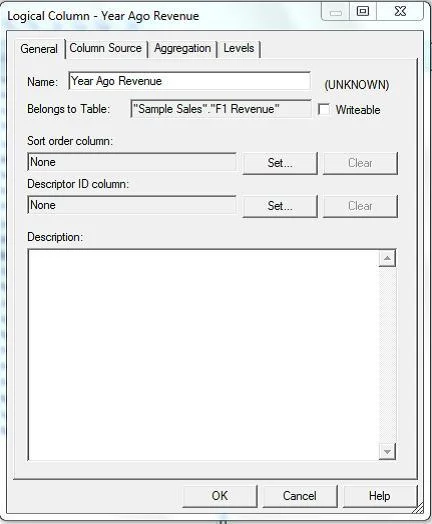
The correct answer is B. Expression Builder. Example (see step 4 and 5 below): Getting Top-N Sales Reps for Year and Year-1 1. Under the "Business Model and Mapping" Layer, right click the "F1 Revenue" and select "New Object" -> "Logical Column..." 2. In the "Logical Column" Window give for Name: Year Ago Revenue as seen…

Developing the Business Model and Mapping Layer of a Repository

Question

Which option is used to enter the rank function when creating a new rank measure?

Exhibit
1Z0-591 question #62 exhibit

Options

  • AInitialization Block
  • BExpression Builder
  • CConnection Pool
  • DWeb Catalog

How the community answered

(45 responses)
  • A
    4% (2)
  • B
    80% (36)
  • C
    2% (1)
  • D
    13% (6)

Explanation

Example (see step 4 and 5 below): Getting Top-N Sales Reps for Year and Year-1 1. Under the "Business Model and Mapping" Layer, right click the "F1 Revenue" and select "New Object" -> "Logical Column..." 2. In the "Logical Column" Window give for Name: Year Ago Revenue as seen below: 3. Goto the "Column Source" Tab and select "Derived from existing columns using an expression" radio button then click on the "Edit Expression" icon. 4. Enter the following expression in the "Expression Builder" Window by selecting "Functions" in the "Category:" list, "Time Series Functions" in the "Functions:" list then "Ago" "Time Series Functions:" section. 5. Select the "<<Measure>>" in the "Ago( )" function, then select "Logical Tables" in the "Category:" list, "F1 Revenue" in the "Logical Tables:" list, then double click the "Revenue" in the "Columns:" list.

Topics

#rank function#Expression Builder#rank measure#logical measures

Community Discussion

No community discussion yet for this question.

Full 1Z0-591 Practice