
1Z0-518 · Question #51
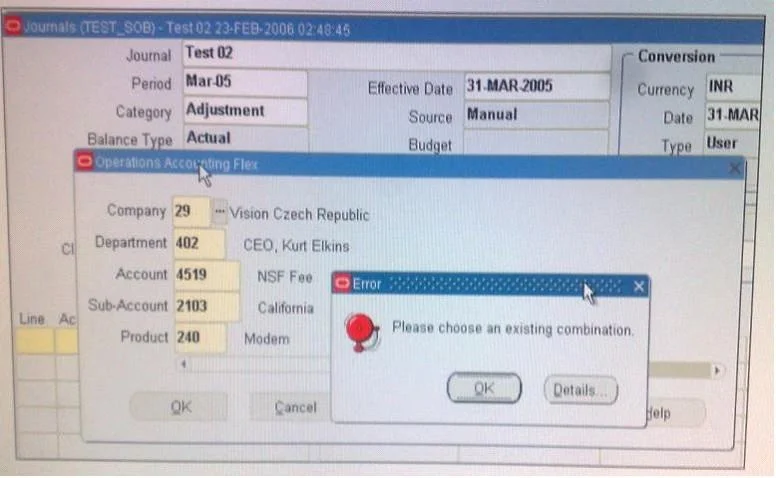
View the Exhibit. While entering a journal in the Journals form, you enter a code combination of 29.402.4519.2103.240 in the five-segment Accounting Flexfield. However, you are unable to proceed…
The correct answer is B. The "Allow Dynamic Inserts" check box is deselected. Allow Dynamic Inserts controls whether users can enter account combinations that don't yet exist in the system. When this checkbox is deselected, Oracle requires that any account combination entered in a journal must already be pre-defined and validated in the combinations…
Question
View the Exhibit. While entering a journal in the Journals form, you enter a code combination of 29.402.4519.2103.240 in the five-segment Accounting Flexfield. However, you are unable to proceed after entering this account combination. What could be the problem in the structure definition of the Accounting Flexfield?
Exhibit
Options
- AThe "Freeze Rollup Groups" check box is selected.
- BThe "Allow Dynamic Inserts" check box is deselected.
- CThe "Freeze Flexfield Definition" check box is selected.
- DThe "Cross-Validate Segments" check box is selected.
How the community answered
(27 responses)- A11% (3)
- B70% (19)
- C4% (1)
- D15% (4)
Explanation
Allow Dynamic Inserts controls whether users can enter account combinations that don't yet exist in the system. When this checkbox is deselected, Oracle requires that any account combination entered in a journal must already be pre-defined and validated in the combinations table - so entering a new combination like 29.402.4519.2103.240 simply fails, blocking the user from proceeding.
Why the distractors are wrong:
- A (Freeze Rollup Groups): This setting affects reporting hierarchies and budget rollups, not whether new account combinations can be entered during transaction entry.
- C (Freeze Flexfield Definition): This locks the structure from being modified by an administrator, but does not prevent end users from entering valid (or already-existing) account combinations.
- D (Cross-Validate Segments): This checks that segment value combinations follow cross-validation rules you've defined - it would generate a specific cross-validation error, not a generic inability to proceed, and only applies if you've actually set up cross-validation rules that the combination violates.
Memory tip: Think of "Dynamic Inserts" as the gatekeeper for new combinations - if it's OFF, the door is locked to any account combination that hasn't been registered in advance. When users report they "can't enter" a brand-new combination, Dynamic Inserts being disabled is the classic culprit.
Topics
Community Discussion
No community discussion yet for this question.