
1Z0-151 · Question #42
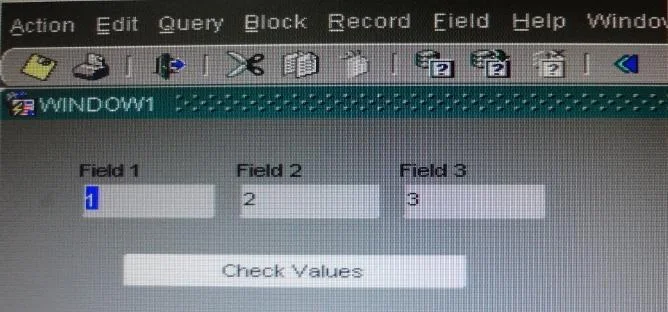
View the Exhibit to examine the form. The text items (Field1, Field2, and Field3) and the button (Check_Values) are in the CONTROL block. The Mouse Navigate property of the button has been set to…
The correct answer is F. 1 - CONTROL.FIELD1 - CONTROL.CHECK_VALUES. SYSTEM.CURSOR_ITEM Represents the name of the block and item, block.item, where the input focus (cursor) is located. The value is always a character string. In this scenario the value is CONTROL.Field1, as the focus is in Field1. SYSTEM.TRIGGER_ITEM Represents the item…
Question
View the Exhibit to examine the form. The text items (Field1, Field2, and Field3) and the button (Check_Values) are in the CONTROL block. The Mouse Navigate property of the button has been set to No. The following code as been written in a When-Button-Pressed trigger on the Check_Values button:
MESSAGE(:field1| | ' - ' | | :SYSTEM.cursor_item | | ' - ' | | :SYSTEM.trigger_item); With the focus in Field1 and the values 1, 2, and 3 in the text items, what message will be displayed when the button is clicked.
Exhibit
Options
- A-4
- B1 -2 -3
- C1 - Field1 - Check Values
- DField1 -1 - Check Values
- E1 - CONTROL.FIELD1 - CONTROL.FIELD1
- F1 - CONTROL.FIELD1 - CONTROL.CHECK_VALUES
- G:field1 - :SYSTEM.cursor_item - :SYSTEM.trigger_item
How the community answered
(22 responses)- B9% (2)
- E5% (1)
- F82% (18)
- G5% (1)
Explanation
- SYSTEM.CURSOR_ITEM Represents the name of the block and item, block.item, where the input focus (cursor) is located. The value is always a character string. In this scenario the value is CONTROL.Field1, as the focus is in Field1. * SYSTEM.TRIGGER_ITEM Represents the item (BLOCK.ITEM) in the scope for which the trigger is currently firing. When began. The value is always a character string. In this scenario the value is CONTROL.CHECK_VALUES, as the CHECK_VALUES button is
Topics
Community Discussion
No community discussion yet for this question.