
1Z0-151 · Question #39
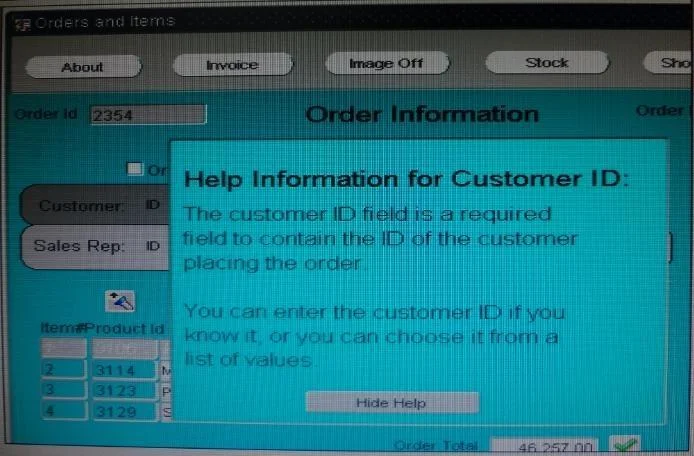
View the Exhibit. The orders form contains two canvases. Orders_CV displays one order and all of its order items. Help-CV displays context-sensitive help. When users invoke the help screen for the…
Sign in or unlock 1Z0-151 to reveal the answer and full explanation for question #39. The question stem and answer options stay visible for context.
Question
View the Exhibit. The orders form contains two canvases. Orders_CV displays one order and all of its order items. Help-CV displays context-sensitive help. When users invoke the help screen for the Customer_Id item, the help information obscures the Custormer_Id item, as shown in the Exhibit. Users would like to be able to see both the item and its help information simultaneously. How can you move the help information to the right so that the Customer_Id item is visible?
Exhibit
Options
- Aincrease the Viewport X Position on the Help_CV canvas.
- Bincrease the Viewport X Position on Canvas on the Orders_CV canvas.
- CDecrease the Width on the Help_CV canvas.
- Din the Layout Editor for the Orders_CV canvas, select View > Stacked Views, and then select the
Unlock 1Z0-151 to see the answer
You've previewed enough free 1Z0-151 questions. Unlock 1Z0-151 for full answers, explanations, the timed quiz mode, progress tracking, and the master PDF. Question stem and options stay visible so you can still see what's on the exam.