
1Z0-058 · Question #138
Which three actions would be helpful in determining the cause of a node reboot?
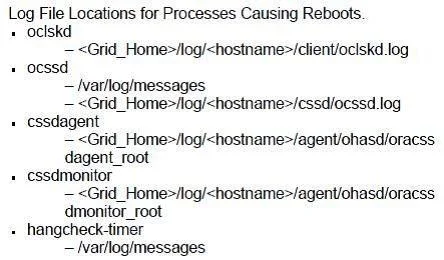
The correct answer is A. determining the time of the node reboot by using the uptime command and subtracting the up B. looking for messages such as "Oracle CSSD failure. Rebooting for cluster integrity" in D. inspecting the ocssd log for "Begin Dump" or "End Dump" messages. Determining Which Process Caused Reboot First, determine the time of the node reboot by using the uptime command and subtracting the up time from the current system time. The reboot time will be used when examining log files. When the OCSSD daemon is responsible for rebooting a…
Question
Which three actions would be helpful in determining the cause of a node reboot?
Exhibit
Options
- Adetermining the time of the node reboot by using the uptime command and subtracting the up
- Blooking for messages such as "Oracle CSSD failure. Rebooting for cluster integrity" in
- Cusing the crsctl command to view tracing information
- Dinspecting the ocssd log for "Begin Dump" or "End Dump" messages
- Einspecting the database alert log for reboot messages
How the community answered
(19 responses)- A68% (13)
- C11% (2)
- E21% (4)
Explanation
Determining Which Process Caused Reboot First, determine the time of the node reboot by using the uptime command and subtracting the up time from the current system time. The reboot time will be used when examining log files. When the OCSSD daemon is responsible for rebooting a node, a message similar to "Oracle CSSD Rebooting for cluster integrity" is written into the system messages log at /var/log/messages. The cssd daemon log file that is located at <Grid_Home>/log/<hostname>/cssd/ocssd.log may also contain messages similar to "Begin Dump" or "End Dump" just before the reboot. If hangcheck- timer is being used, it will provide message logging to the system messages log when a node restart is initiated by the module. To verify whether this process was responsible for the node reboot, examine the /var/log/messages file and look for an error message similar to: "Hangcheck: hangcheck is restarting the machine." Other useful log files include the Clusterware alert log in <Grid_home>/log/<hostname> and the lastgasp log in /etc/oracle/lastgasp or /var/opt/oracle/lastgasp. If no indication of which process caused the reboot can be determined from these files, additional debugging and tracing may need to be enabled. Note: The oclsomon and the oprocd background processes have been eliminated in Oracle Database 11g Release 2.
Topics
Community Discussion
No community discussion yet for this question.