
1Y0-A22 · Question #103
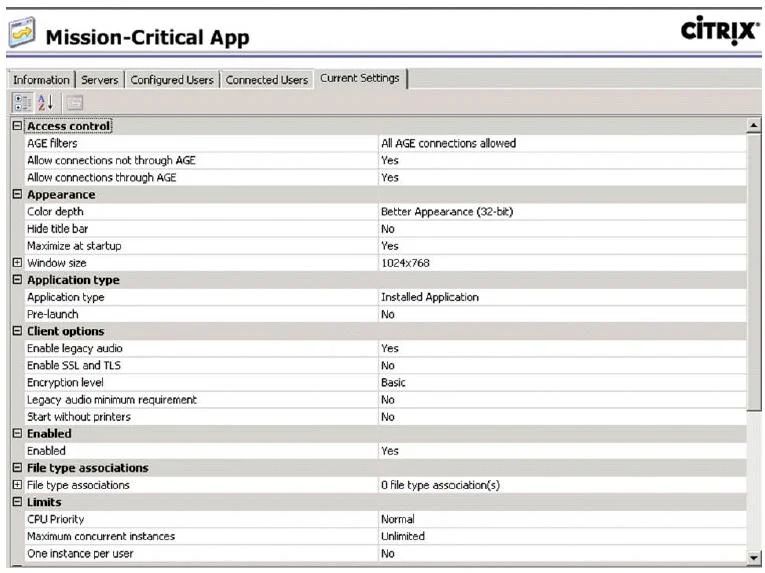
Users complain that their main application, Mission-Critical App, takes longer to start than their other applications. Click the Exhibit button to view a screenshot of the properties of the mission…
The correct answer is A. Pre-launch. D. Start without printers. See the full explanation below for the reasoning.
Question
Users complain that their main application, Mission-Critical App, takes longer to start than their other applications. Click the Exhibit button to view a screenshot of the properties of the mission critical application. Based on the published application properties shown in the Exhibit, which two settings should be altered to decrease application launch time? (Choose two.)
Exhibit
Options
- APre-launch.
- BWindow size.
- CEnable legacy audio.
- DStart without printers.
- EFile type associations.
- FMaximum concurrent instances.
How the community answered
(50 responses)- A78% (39)
- B6% (3)
- C12% (6)
- E2% (1)
- F2% (1)
Community Discussion
4 Bao N.Jun 27, 2026
A and D are your picks here. Pre-launch is the big one, when that is not configured the app has to spin up a fresh ICA session from scratch every time a user launches it, and that cold-start delay is exactly what complaints like this point to. Setting it to pre-launch means XenApp warms up the session in the background before the user even clicks, so launch feels nearly instant. Start without printers is the other one, because printer mapping at session startup is a notorious time sink, especially in environments with a lot of mapped printers or slow print servers, and disabling that lets the app get to the desktop faster while printers catch up in the background. The other options like window size, legacy audio, file type associations, and max concurrent instances have nothing to do with how fast the application initializes.
 Carlos M.Jun 26, 2026
A and D are right. Pre-launch keeps the app warm, and skipping printer mapping cuts startup delay.
 Yusuf A.Jun 27, 2026
So I had a senior walk me through this one and it clicked pretty fast once he pointed out that anything the server has to do BEFORE handing you the app is going to add time, like spinning up printer mappings at launch even when the app does not need them right away. Pre-launch makes sense too since you can have the app ready in the background before the user even clicks it. My question is, does Pre-launch always help or does it depend on how many users are hitting the farm at once, because I would think staging a bunch of pre-launched sessions could actually slow things down on a busy box?
Carlos M.Jun 27, 2026Pre-launch helps most when you have spare capacity to stage idle sessions, but on a heavily loaded farm it can actually compete with active sessions for memory and CPU, so most shops throttle it with the Pre-launch Any User or Pre-launch Assigned User policy and tie it to a load threshold so it backs off when the host is under pressure.