
1Y0-403 · Question #65
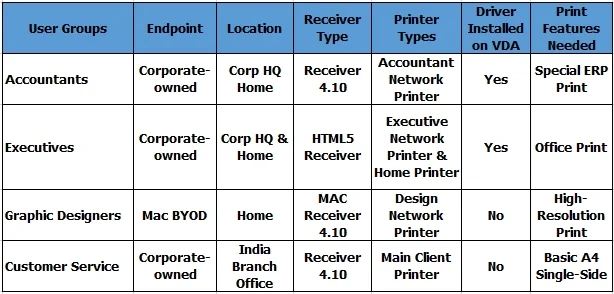
Scenario: A Citrix Architect needs to design a new XenApp and XenDesktop environment. The architect has identified printing requirements for certain user groups and locations, as shown in the…
The correct answer is C. Set Direct connections to print servers policy to Enabled G. Why? Explanation/Reference: Direct connections to print servers This setting enables or disables direct connections from the virtual desktop or server hosting applications to a print server for client printers hosted on an accessible network share. By default, direct connections are…
Question
Scenario: A Citrix Architect needs to design a new XenApp and XenDesktop environment. The architect has identified printing requirements for certain user groups and locations, as shown in the Exhibit. Click the Exhibit button to view the requirements. Currently, no printer settings or policies have been configured, and as such, the environment is using default settings. Universal Print Server will NOT be used in this design. Which two settings should the architect configure to allow the Executives group to achieve the desired print behavior and to ensure their print jobs are optimally routed? (Choose two.)
Exhibit
Options
- ASet Auto-create Client Printers policy to auto-create local printers only. No, because we want all client
- BEnable Auto-create PDF Universal Printer policy
- CSet Direct connections to print servers policy to Enabled
- DSet Direct connections to print servers policy to Disabled
- EConfigure Session Printers policy - No, because we will have to list all the network printers to be auto-
- FConfigure Default Printers policy
- GWhy?
How the community answered
(55 responses)- A2% (1)
- B15% (8)
- C71% (39)
- D4% (2)
- E9% (5)
Explanation
Explanation/Reference: Direct connections to print servers This setting enables or disables direct connections from the virtual desktop or server hosting applications to a print server for client printers hosted on an accessible network share. By default, direct connections are enabled. Enable direct connections if the network print server is not across a WAN from the virtual desktop or server hosting applications. Direct communication results in faster printing if the network print server and the virtual desktop or server hosting applications are on the same LAN. Disable direct connections if the network is across a WAN or has substantial latency or limited bandwidth. Print jobs are routed through the user device where they are redirected to the network print server. Data sent to the user device is compressed, so less bandwidth is consumed as the data travels across the If two network printers have the same name, the printer on the same network as the user device is used. https://docs.citrix.com/en-us/xenapp-and-xendesktop/7-15-ltsr/policies/reference/ica-policy- settings/ printing-policy-settings/client-printers-policy-settings.html printers which will include local (non-network) and network printers.
Topics
Community Discussion
No community discussion yet for this question.