
Citrix
1Y0-403 · Question #223
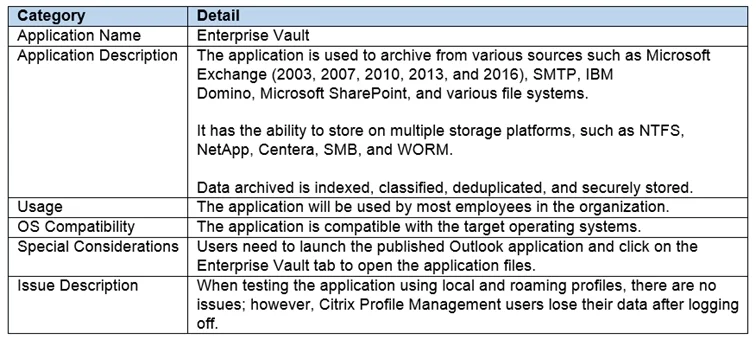
Scenario: A Citrix Architect is designing a new Citrix Virtual Apps and Desktops environment. The Click the Exhibit button to view the requirements. Which Citrix Profile Management configuration…
The correct answer is D. Enable Active write back. Explanation/Reference:
Advanced Configuration for a Citrix Virtual Apps and Desktops Solution
Question
Scenario: A Citrix Architect is designing a new Citrix Virtual Apps and Desktops environment. The Click the Exhibit button to view the requirements. Which Citrix Profile Management configuration could help the architect address the issue referenced in the exhibit?
Exhibit
Options
- AEnable Cross-platform
- BAdd the application folder to the Inclusion policy
- CAdd the application folder to the Exclusion policy
- DEnable Active write back
How the community answered
(24 responses)- A4% (1)
- B8% (2)
- C13% (3)
- D75% (18)
Explanation
Explanation/Reference:
Topics
#Profile Management#active write back#profile configuration#application settings
Community Discussion
No community discussion yet for this question.