
1Y0-403 · Question #20
Scenario: A Citrix Architect is designing a new Citrix Virtual Apps and Desktops environment. The design has a Primary Zone and 3 Satellite Zones. Each Satellite Zone has a number of Virtual…
The correct answer is C. Edit the application properties to set Zone-SFO as the Home Zone for SharePoint. Explanation/Reference: https://docs.citrix.com/en-us/citrix-virtual-apps-desktops-service/manage-deployment/ zones.html#manage-home-zones-for-applications
Question
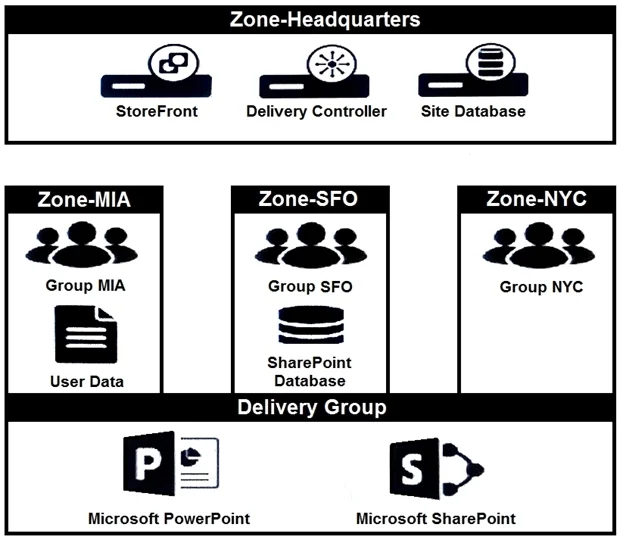
Scenario: A Citrix Architect is designing a new Citrix Virtual Apps and Desktops environment. The design has a Primary Zone and 3 Satellite Zones. Each Satellite Zone has a number of Virtual Delivery Agent (VDA) machines that belong to a single Delivery Group spanning all 3 Satellite Zones. Click the Exhibit button to view more details about the configuration. How should the architect ensure that the SharePoint application has optimal performance for all user groups?
Exhibit
Options
- AUse PowerShell to change the process priority to high for SharePoint within Zone-SFO.
- BPublish SharePoint in an individual Delivery Group within each zone.
- CEdit the application properties to set Zone-SFO as the Home Zone for SharePoint.
- DEdit the zone properties to only allow SharePoint to launch in Zone-SFO.
How the community answered
(45 responses)- A7% (3)
- B16% (7)
- C73% (33)
- D4% (2)
Explanation
Explanation/Reference: https://docs.citrix.com/en-us/citrix-virtual-apps-desktops-service/manage-deployment/ zones.html#manage-home-zones-for-applications
Topics
Community Discussion
No community discussion yet for this question.