
1Y0-403 · Question #128
Scenario: A Citrix Architect has implemented a multi-location profile strategy as part of a large XenApp and XenDesktop solution. The architect needs to implement a single policy that sets the…
The correct answer is A. A Loc variable using the Current-Location attribute. Explanation/Reference: https://docs.citrix.com/en-us/profile-management/current-release/configure/specify-user-store-path.html \\#l#.userstore.myschools.net\profile\#sAMAccountName#\%ProfileVer%\ For Paris, this is expanded to…
Question
Scenario: A Citrix Architect has implemented a multi-location profile strategy as part of a large XenApp and XenDesktop solution. The architect needs to implement a single policy that sets the profile path for all users. New York users – Server:NYC-FS.company.lan – Share: NYC-Profiles$ Miami users – Server:MIA-FS.company.lan – Share: MIA-Profiles$ San Francisco users – Server:SFO-FS.company.lan – Share: SFO-Profiles$ The architect has proposed the usage of the following path for all users:
\#Loc#-FS.company.lan#Loc#-Profiles$#sAMAccountName#%ProfileVer%\ What does the architect need to define in order to use the above path for all users as the profile location?
Exhibit
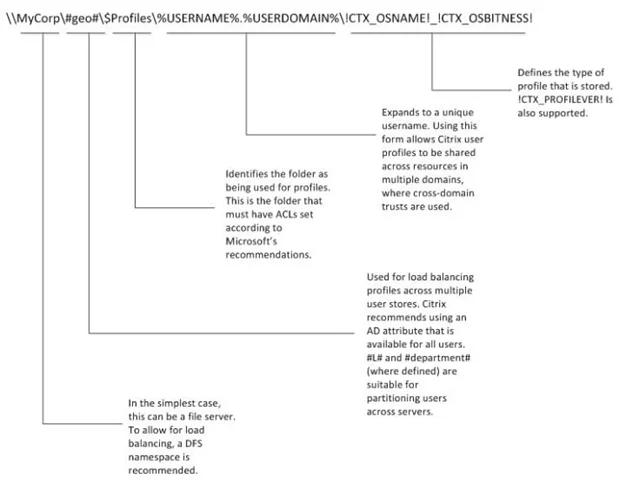
Options
- AA Loc variable using the Current-Location attribute
- BA new attribute called Loc using Active Directory Explorer
- CA user environment variable Loc using a login script
- DA DFS-ROOT variable per datacenter and incorporate the user environment variable %homeshare%
How the community answered
(20 responses)- A70% (14)
- B5% (1)
- C20% (4)
- D5% (1)
Explanation
Explanation/Reference: https://docs.citrix.com/en-us/profile-management/current-release/configure/specify-user-store-path.html \#l#.userstore.myschools.net\profile#sAMAccountName#%ProfileVer%\ For Paris, this is expanded to: \Paris.userstore.myschools.net\profile\JohnSmith\v1\
Topics
Community Discussion
No community discussion yet for this question.