
1Y0-201 · Question #58
Scenario: A Citrix Administrator created a Device Collection and a Delivery Group for the Human Resources (HR) and Accounting user groups. The administrator used the XenDesktop Setup Wizard to…
The correct answer is A. Change the V: drive to another drive letter. The HR users fail to access the V: drive because that drive letter is already in use within their environment, while the Accounting group does not have this conflict.
Question
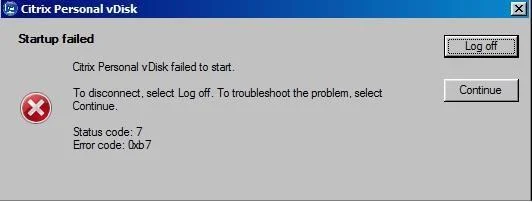
Scenario: A Citrix Administrator created a Device Collection and a Delivery Group for the Human Resources (HR) and Accounting user groups. The administrator used the XenDesktop Setup Wizard to create the Desktop OS machines and assigned the V: drive as their personal drives. While testing all the new configurations prior to rolling out the Desktop OS machines to the HR user group, the administrator receives an error when attempting to access the V: drive. Users from the Accounting user group do NOT receive the error. Click on the Exhibit button to view the error. How could the administrator resolve this issue?
Exhibit
Options
- AChange the V: drive to another drive letter.
- BRun the inventory update on the master image and release the image to the HR user group.
- CRecreate the master image with Personal vDisk and release that image to the HR user group.
- DDelete all of the Desktop OS machines and rerun the Streamed VM Setup Wizard to recreate the
How the community answered
(27 responses)- A67% (18)
- B7% (2)
- C4% (1)
- D22% (6)
Why each option
The HR users fail to access the V: drive because that drive letter is already in use within their environment, while the Accounting group does not have this conflict.
Changing the personal vDisk drive letter to one that is not already mapped or reserved in the HR user group environment directly eliminates the conflict causing the error. Because Accounting users do not see the error, the conflict is specific to the HR environment - such as an existing network drive or Group Policy mapped drive using V: - and reassigning the letter resolves it without requiring any image changes.
Running an inventory update on the master image addresses Personal vDisk software inventory synchronization issues, not a drive letter conflict between the assigned personal drive and an existing mapping.
Recreating the master image with Personal vDisk does not resolve a drive letter conflict; the same conflict would reoccur after recreation if the letter remains V:.
Rerunning the Streamed VM Setup Wizard recreates the machines but does not change the drive letter assignment, so the conflict in the HR environment would persist.
Concept tested: Personal vDisk drive letter conflict resolution
Source: https://docs.citrix.com/en-us/xenapp-and-xendesktop/7-15-ltsr/install-configure/personal-vdisk.html
Topics
Community Discussion
No community discussion yet for this question.